Festival Maker
Lesson 3: Play the Game!
Students continue gameplay in Symphonia, using tempo and loudness data to activate creatures, build evidence-based playlists, and collect loot for festival design.
Overview
Students continue gameplay in the world of Symphonia, refining their understanding of how tempo and loudness affect creatures. They collect and analyze data, build playlists based on evidence, and gather loot that will be used in festival design.
Student Objectives
- ✓ I can use tempo and loudness data to decide which songs activate creatures.
- ✓ I can record accurate data during gameplay.
- ✓ I can build and revise playlists based on evidence.
- ✓ I can collect loot to use in festival design.
- ✓ I can reflect on how data informs decisions.
At a Glance
Total: about 45 minutes-
Welcome & Grounding
2 min · Slides 2–4
Play music as students enter and display the "Think" slide. Have students reflect silently on Day 2, then invite volunteers to share.
-
Connector
4 min · Slides 5
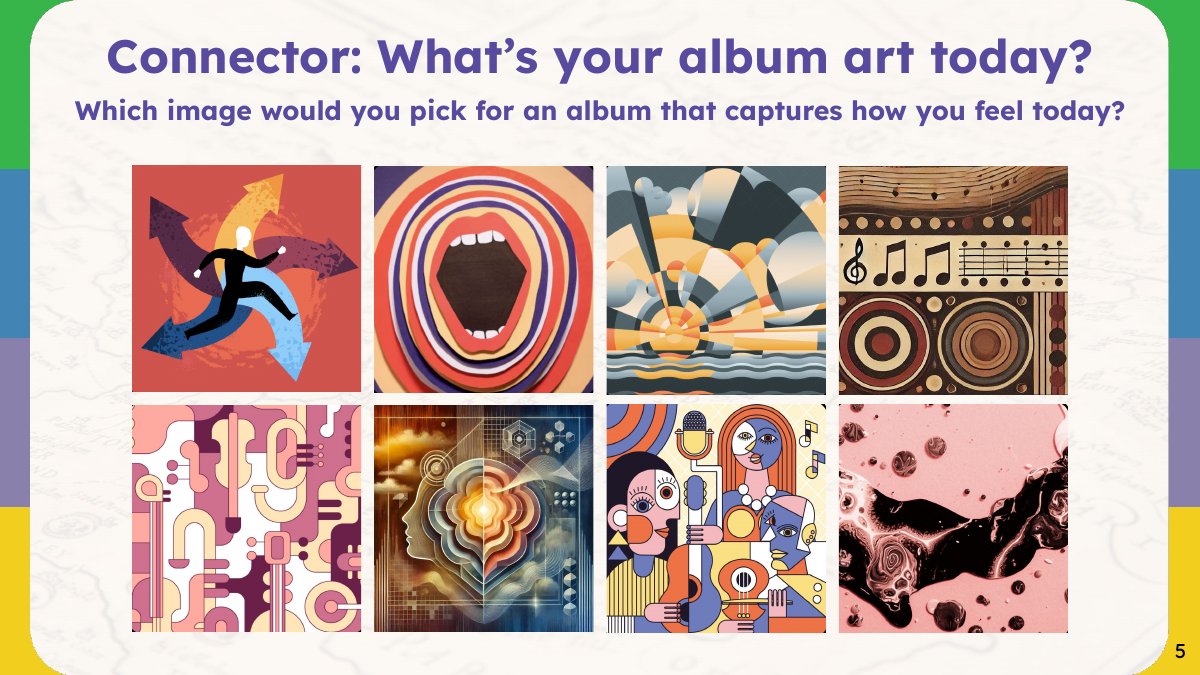
Students view a collection of album art images and choose the one that best matches how they feel today. They share their choice and reasoning with a partner or small group, or reflect quietly on their own.
-
Review Visual Agenda & Agreements
2 min · Slides 6–7
Review "Today's Adventure" and the classroom agreements, reinforcing expectations for teamwork, clarifying how students should handle challenges and confusing moments during gameplay.
-
Pulling Up Data from Yesterday
5 min · Slides 8
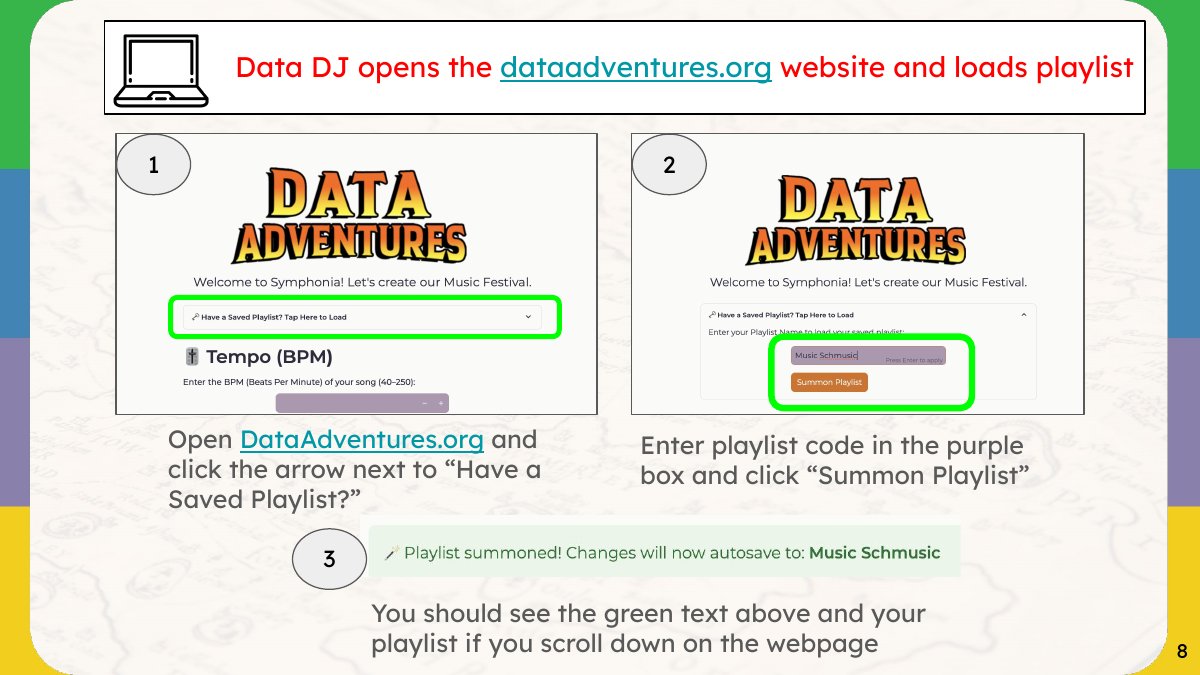
Teams load their saved playlist. The Data DJ opens dataadventures.org/festival/app, clicks the "Have a saved playlist…" button, and enters their code. There is an autosave, so students do not need to save again. Once every team has their playlist loaded, move on. If a team can't remember their code, look it up by name at dataadventures.org/teachers/playlists — a teacher page that lists every saved playlist.
-
Completing Challenges & Gathering Loot
7 min · Slides 9–13
Introduce the Challenge — one per region, required to move forward. Teams fill in the answers together and bring them to you to be checked; give feedback from the answer sheets. Then explain Loot — each creature card shows how much loot it carries, and teams already totaled their Chorus of Commons loot in the Loot Count box on the Graphing Mat. Release teams to complete the Chorus of Commons challenge and collect its loot.
-
Team Play & Data Tracking
20 min · Slides 14–15
Teams repeat yesterday's full loop — graphing, matching, building the playlist, completing the challenge, and gathering loot — at their own pace, working through The Backbeat first and then the Forge of Form. Circulate, supporting graph-based decisions and accurate data entry.
-
Reflection & Closing Ritual
5 min · Slides 16–17
Make a connection to one Data Habit of Mind and record it in the Data Habits of Mind Tracker. Guide students through a brief "Creature Reset" — a short calming/reset routine.
| Section | Time | Slides | What happens |
|---|---|---|---|
| Welcome & Grounding | 2 min | 2–4 | Play music as students enter and display the "Think" slide. Have students reflect silently on Day 2, then invite volunteers to share. |
| Connector | 4 min | 5 | Students view a collection of album art images and choose the one that best matches how they feel today. They share their choice and reasoning with a partner or small group, or reflect quietly on their own. |
| Review Visual Agenda & Agreements | 2 min | 6–7 | Review "Today's Adventure" and the classroom agreements, reinforcing expectations for teamwork, clarifying how students should handle challenges and confusing moments during gameplay. |
| Pulling Up Data from Yesterday | 5 min | 8 | Teams load their saved playlist. The Data DJ opens dataadventures.org/festival/app, clicks the "Have a saved playlist…" button, and enters their code. There is an autosave, so students do not need to save again. Once every team has their playlist loaded, move on. If a team can't remember their code, look it up by name at dataadventures.org/teachers/playlists — a teacher page that lists every saved playlist. |
| Completing Challenges & Gathering Loot | 7 min | 9–13 | Introduce the Challenge — one per region, required to move forward. Teams fill in the answers together and bring them to you to be checked; give feedback from the answer sheets. Then explain Loot — each creature card shows how much loot it carries, and teams already totaled their Chorus of Commons loot in the Loot Count box on the Graphing Mat. Release teams to complete the Chorus of Commons challenge and collect its loot. |
| Team Play & Data Tracking | 20 min | 14–15 | Teams repeat yesterday's full loop — graphing, matching, building the playlist, completing the challenge, and gathering loot — at their own pace, working through The Backbeat first and then the Forge of Form. Circulate, supporting graph-based decisions and accurate data entry. |
| Reflection & Closing Ritual | 5 min | 16–17 | Make a connection to one Data Habit of Mind and record it in the Data Habits of Mind Tracker. Guide students through a brief "Creature Reset" — a short calming/reset routine. |
Materials & Prep
- Challenge sheetsOne copy per group of three.
- Buffet Data CardsOne set for the loot buffet.Label the region-specific and data-specific loot at the buffet.
- Data Habits of Mind TrackerCarried over from Avatar Maker. Used in the closing reflection.
- Creature cards
- Song sheets
- Graphing matEach team's mat from Lesson 2, with their playlist name on the back.
- Translucent range windows
- Team role cards
- Red, yellow, and blue colored pencils
- Highlighters
- Game piecesOne per team, for moving to the challenge locations on the game map.
- Data Habits of Mind cards
- Region-specific lootWith Buffet Data Cards. Set up as a color-coded loot buffet (blue, yellow, red).
- Projector
- Headphones1 per group.
- Optional supportsNoise-reducing headphones, pause cards, sentence frames, multilingual vocabulary cards, visual reference posters, and a sensory guide.
- Facilitation Slide Deck — Day 3
- Festival Maker app — dataadventures.org/festival/appEach group needs one computer with sound, headphones, and internet access.
- Teacher tool — look up saved playlistsTeacher-facing (don't share with students). If a team forgets their playlist name/code, search saved playlists here.
- Reserve one laptop, Chromebook, or iPad per team — charged, with working sound and a pair of headphones to share.
- On a student device connected to the school network, open dataadventures.org/festival/app and play a song — songs play through YouTube on the site, so this confirms the school's web filter allows both the app and YouTube, and that audio comes through.
- Bookmark the teacher playlist lookup page (dataadventures.org/teachers/playlists) on your own device — you'll need it if a team loses their playlist code.
- Set up activity materials at each table for gameplay.
- Set up the color-coded loot buffet (blue, yellow, red) for the region-specific loot.
- Ensure team roles are assigned or reviewed.
- Cue music for arrival.
- Display the visual agenda and sensory guide.
- Review the Challenges and their answers so you are ready to give feedback to groups.
- Collect and organize student data materials.
- Reflect on pacing, engagement, and data accuracy.
- Note any misconceptions about tempo, loudness, or data interpretation.
- Prepare materials for continued gameplay in the next session.
Slides & Teaching Guide
How to use these speaker notes
Every slide's notes follow the same four labels so you can find what you need at a glance.
- Time:
- Approximate pacing for the slide.
- Example Script:
- Suggested language to say to students. Paraphrase freely to match your voice.
- Do:
- Appears only when a specific action or facilitation move is needed (invite a volunteer, collect a data sheet, etc.). If you don't see a "Do" line, the script is all that's needed.
- Purpose:
- Why the slide is here and what it's building toward in the lesson.
-
Slide 2 · Lesson 3
No teaching notes for this slide.
-
Slide 3 · Lesson Three
No teaching notes for this slide.
-
Slide 4 · Welcoming and Grounding
1 minAs you come in, listen to the music for a moment and notice what it does to your mood, energy, or body. You do not need to answer out loud yet. Just think: How does music affect my mood?
Do: Play music as students enter (linked to the upper right hand corner of the slide). Invite volunteers to share one word, phrase, or idea.
Purpose: Grounding students to lesson.
-
Slide 5 · Connector: What’s your album art today?
4 minLook at the album art choices. Choose the image that best matches how you feel today. You can share your choice with a partner or small group, or you can keep your answer as a quiet reflection.
Do: Give students a short moment to choose an image. Invite students to share with a partner or small group.
Purpose: Connecting students with each other and the lesson.
-
Slide 6 · Continue Game Play
1 minToday we are continuing our Festival Maker gameplay. We will continue the game, graph our data, collect more loot for our festival, and keep building our playlist based on evidence.
Do: Emphasize that students are using data, not just personal preference, to make playlist decisions. Let students know they will continue working with their team roles and materials.
Purpose: Sharing agenda.
-
Slide 7 · Our Classroom Agreements
1 minBefore we start, let’s return to our classroom agreements. These agreements help us work as teams, try new ideas, and make sure everyone has a way to participate. As we play today, we will need to listen, take turns, use evidence, and help each other stay with the process.
Do: Copy and paste the co-created agreements into the slide.
Purpose: Revisit the agreements.
-
Slide 8 · 3
5 minutesBefore we start, we need to pull up our data from yesterday so we can gather or loot from the chorus of commons and build our playlist for the Backbeat and the Forge of Form. Pull out one laptop for the group, and open the dataadventures.org website. Then enter your playlist code in the appropriate spot, followed by clicking Summon PLaylist. Scroll down to make sure all of your data loaded.
Do: Have a students from the group bring out computer (likely the Data DJ from yesterday), and have them go to the website and complete each step. Double check that all students have been able to access their playlists. Have the lists of codes from yesterday handy just in case.
Purpose: Have the playlists ready to go to add more songs from Backbeat and Chorus of Commons.
-
Slide 9 · How to play Festival Maker
1 minuteToday we are picking up with completing challenges so you can access your loot
Purpose: Pick up and finalize gameplay from prior day.
-
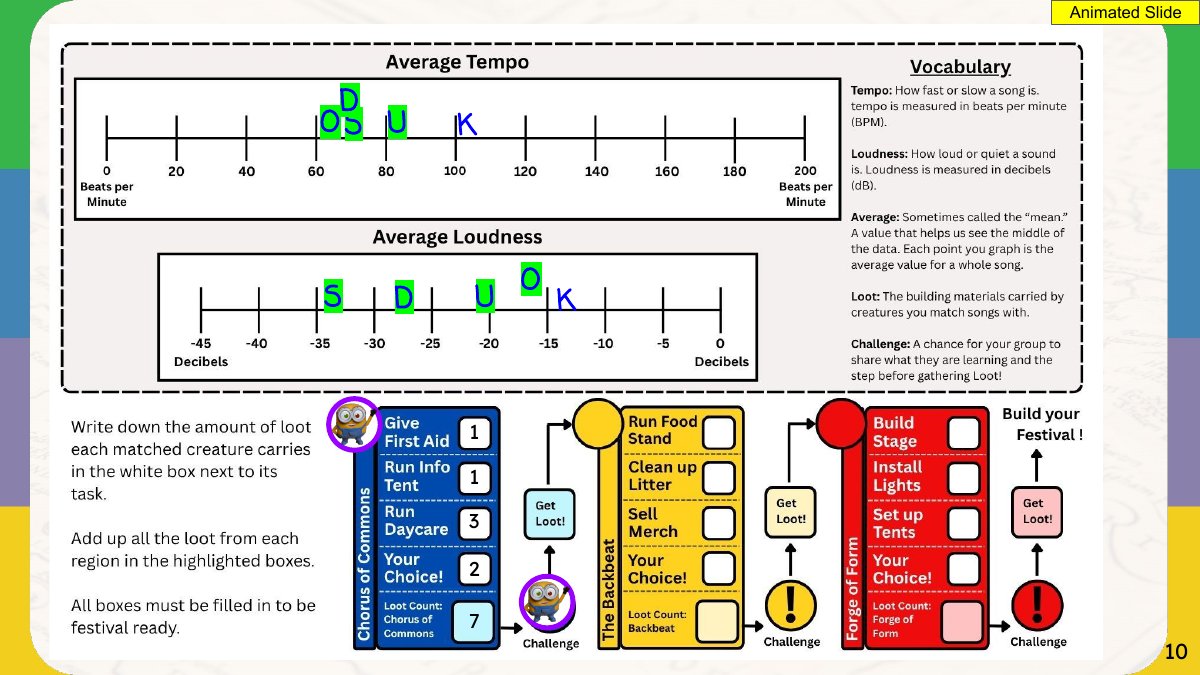
Slide 10 · Move to the Chorus of Commons challenge
1 minuteNow we need to complete the challenge from the Chorus of commons before we can move on to get our loot and move to the next regions. The Summoner should move the game piece to the first challenge location.
Do: Point to the challenge locations on the game map and have students move their game pieces
Purpose: Game play modeling.
-
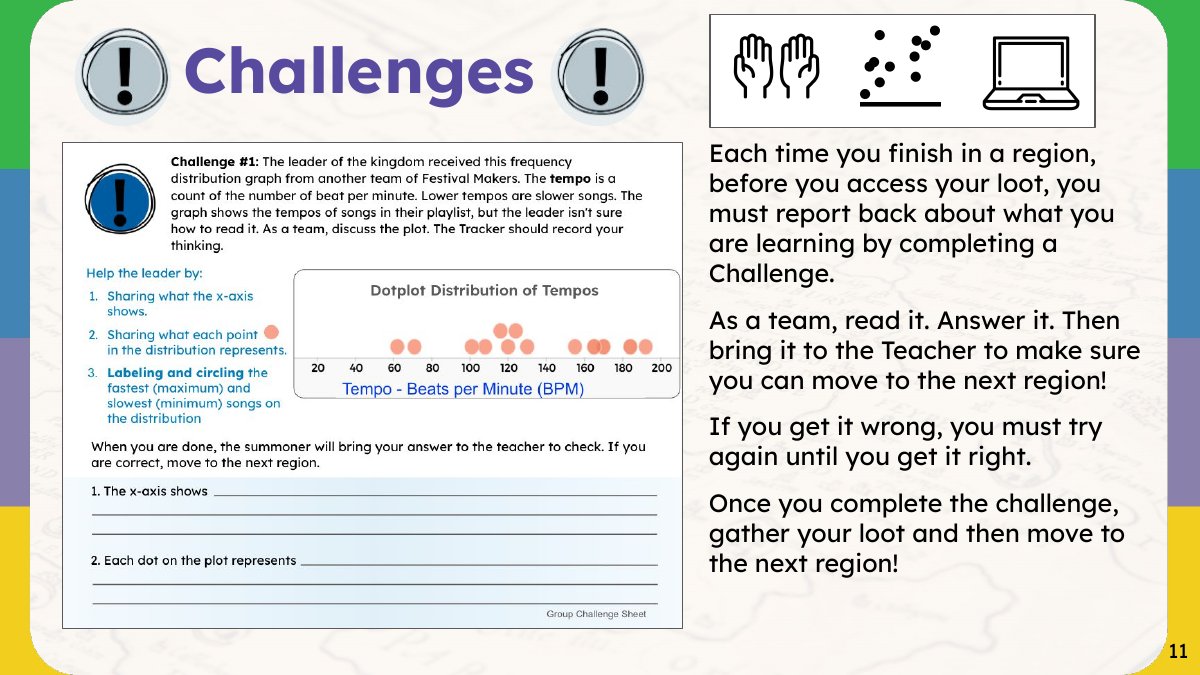
Slide 11 · Challenges
3 minutesTo complete a challenge and move forward in the game, your team will read the challenge, answer the questions, and check your work before moving on. Once I pass this out to you, complete it and bring it back to me to check. Once you have answered the questions correctly, you can grab your loot. But first we need to talk about the loot you can grab.
Do: Complete the written challenges and check answers with teach.
Purpose: Ensures students demonstrate understanding of key data concepts before progressing through the adventure.
-
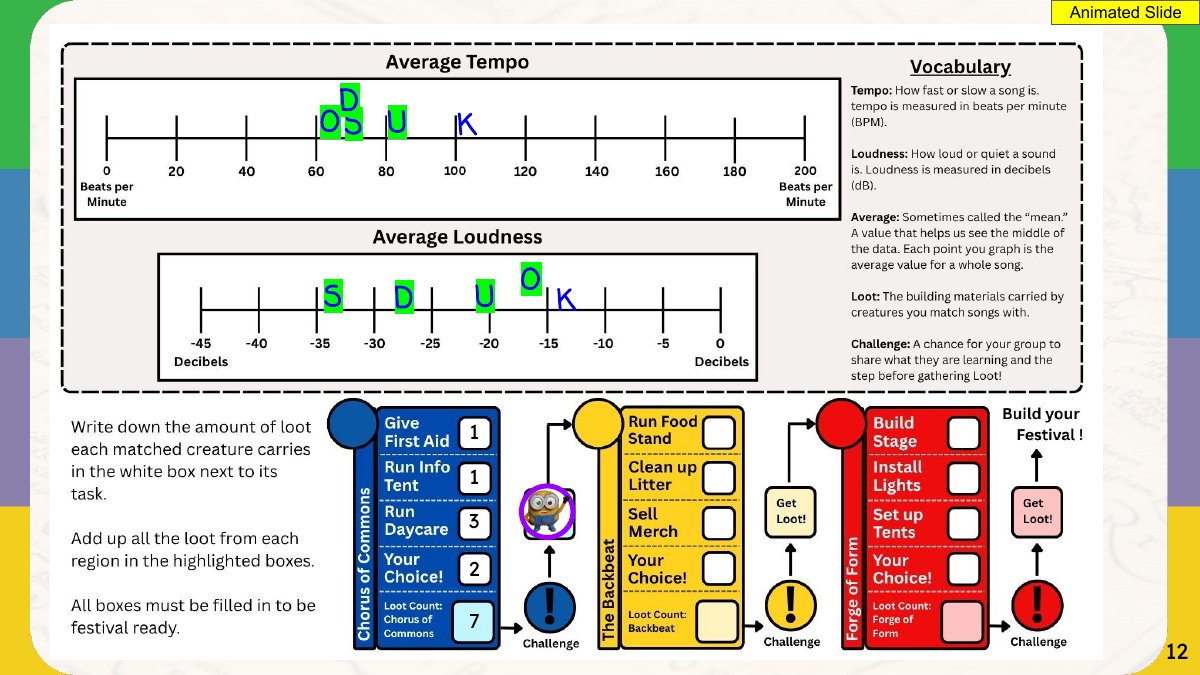
Slide 12 · Move your game piece to the challenge location
1 minuteNow we need to complete the challenge from the Chorus of commons before we can move on to get our loot and move to the next regions. The Summoner should move the game piece to the first challenge location.
Do: Point to the challenge locations on the game map and have students move their game pieces
Purpose: Game play modeling.
-
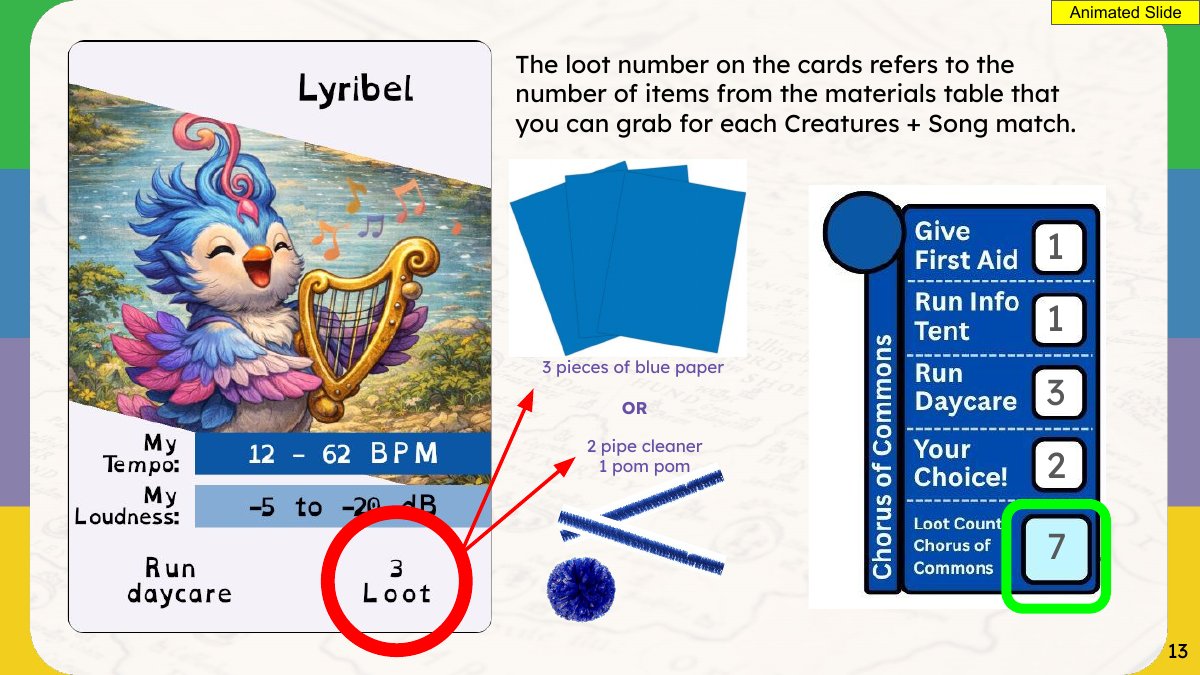
Slide 13 · The loot number on the cards
1 minuteOnce a region is complete in the full game, the team counts the loot connected to the creatures they matched. The loot number on each card tells you how many items your team collects. This loot will be used later to design your festival, so the choices you make now will matter later. Think about what might help Lyribel run the festival’s daycare?
Do: Point to the loot number on the Creature card. Show how the loot total is calculated. Clarify what counts as one piece of loot in your classroom materials.
Purpose: Explains how loot is earned through successful matches and how it is used to gather materials needed for the festival.
-
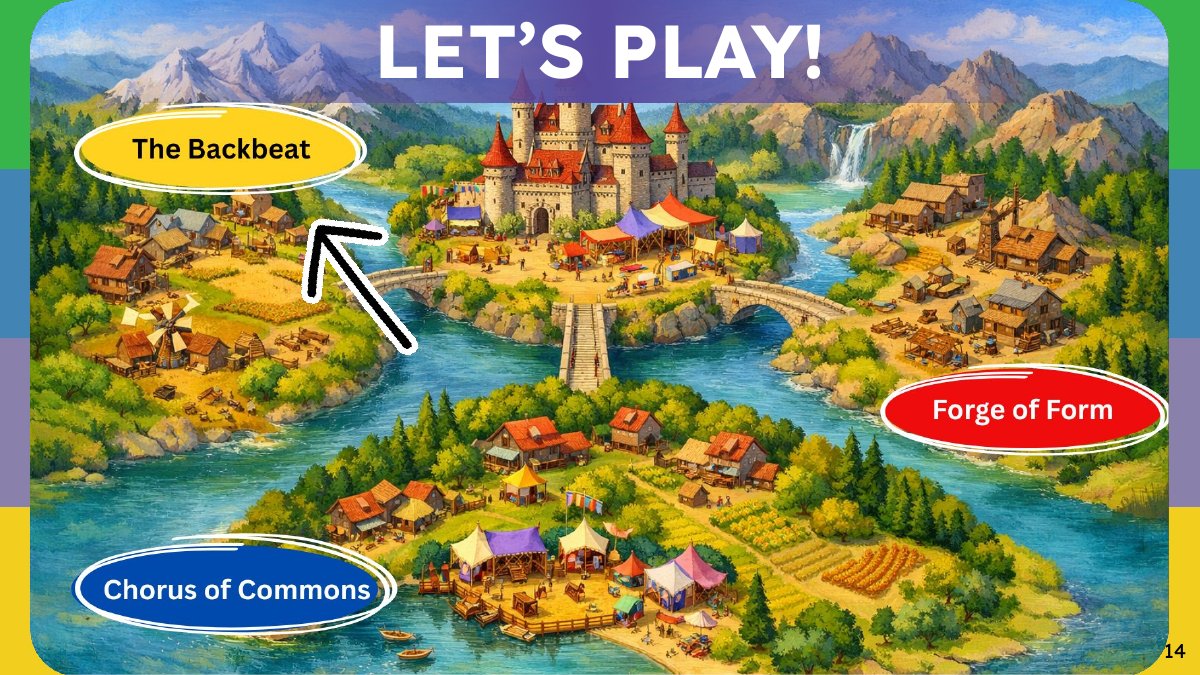
Slide 14 · LET’S PLAY!
20 min. for gameplayToday we will start in The Backbeat. As your team plays, remember that your data is what helps you make decisions. Use your graph to defend your choices. Record your data carefully. Revise your playlist when the evidence shows something new. Pause when you collect loot so your team can make sure your data and playlist decisions match.
Do: Circulate while teams play. Prompt teams to explain how the data connects to creature activation. Offer optional supports as needed, such as sentence frames, pause cards, multilingual vocabulary cards, noise-reducing headphones, or visual reference posters.
Purpose: Signals the transition from learning the game to actively playing it and applying data skills in the first region.
-
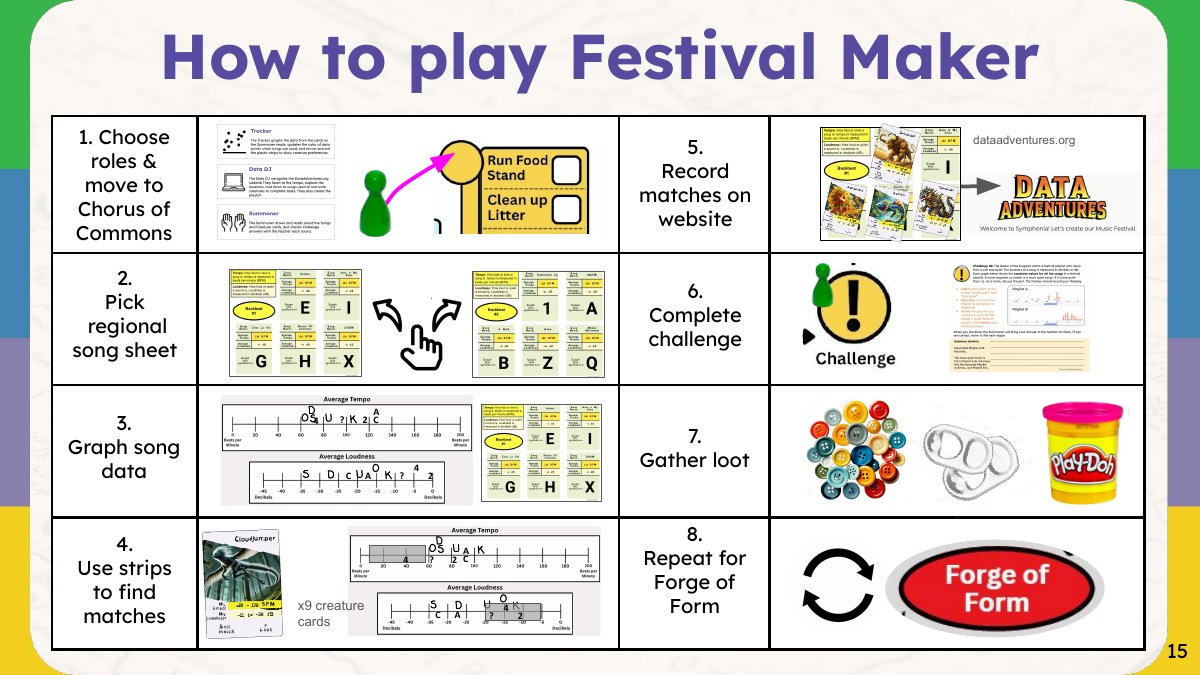
Slide 15 · How to play Festival Maker
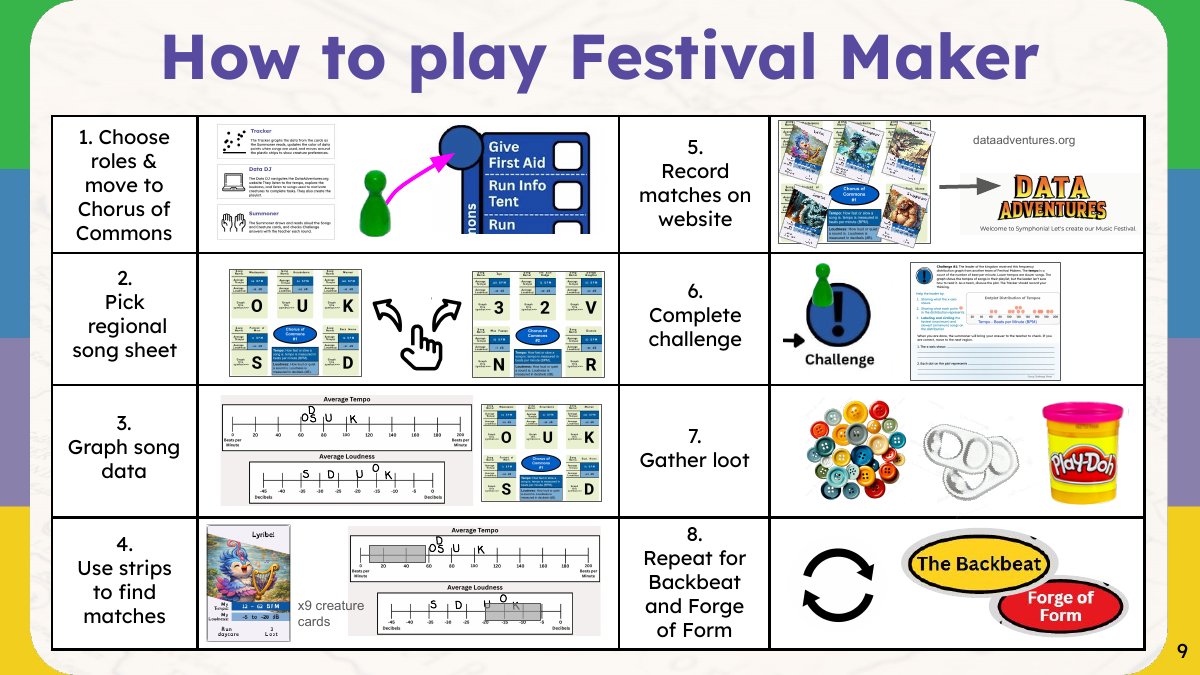
20 min. for gameplayThis slide reviews the full gameplay cycle again. The pattern is: assign roles, move to the next region, pick a song sheet, graph the song data, match creatures using evidence, record matches later, complete challenges later, gather loot, and repeat for the remaining regions. Today, our focus is practicing the steps and understanding the flow, tomorrow we will play the game.
Do: Ask students to identify the step that feels clearest and the step that still feels confusing.
Purpose: Shows students the steps of how to play the game (reinforces).
-
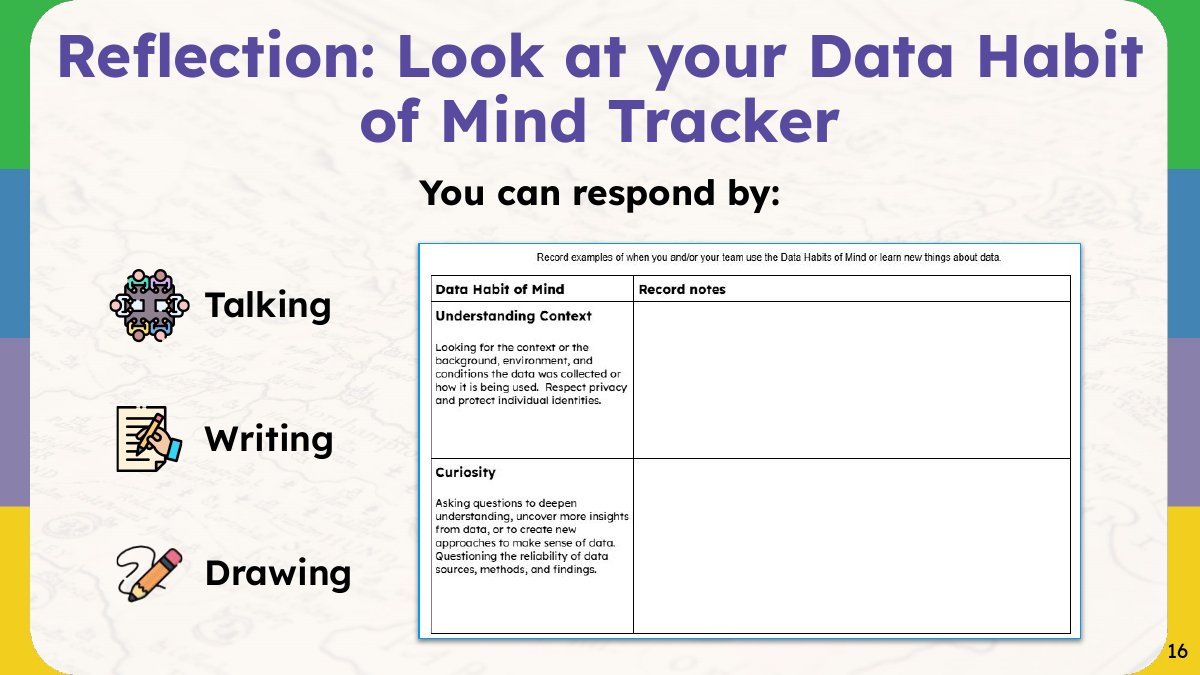
Slide 16 · Reflection: Look at your Data Habit of Mind Tracker
4 min.Now make a connection to one of the Data Habit of Mind using your tracker. You can think about curiosity, context, communication, or perseverance. Record your connection in the tracker. You can write, draw, or use words that make sense to you. There is no one right answer. You might have used curiosity when you explored a station, context when you thought about music choices, communication when you shared with a partner, or perseverance when something felt confusing.
Do: Direct students to the Data Habit of Mind Tracker. Ask students to choose one Data Habit of Mind. Have students record a connection in the tracker. Allow multiple response modes: writing, drawing, talking first, or quiet reflection.
Purpose: Connect back to Data Habit of Mind.
-
Slide 17 · Closing Ritual: Creature Reset
1 min.Take a moment to breathe before we move on. Imagine your creature finding a calm, safe place in Symphonia. You do not have to say anything out loud. Just take a quiet moment to reset. Use the gif to cue you when to inhale, pause, and exhale..
Do: Play the embedded audio. Give students a quiet moment to breathe or reset.
Purpose: Closing Ritual.