Festival Maker
Lesson 2: Learning to Play the Game
Students enter the world of Symphonia to learn how to play Festival Maker, working through one full round in the Chorus of Commons region — graphing tempo and loudness, matching and activating creatures, and recording their first playlist on the website.
Overview
Students enter the world of Symphonia to explore how tempo and loudness affect creatures. They collect and analyze data through gameplay and begin building playlists, while gathering loot that will later be used to design their festival. The Symphonia gameplay extends over multiple days. Students should be split into their small groups at the start of class, given the game materials, and given access to Challenges and Loot somewhere in the classroom. In addition to game materials, each group needs one laptop and a pair of headphones to share.
Student Objectives
- ✓ I can use tempo and loudness data to activate creatures.
- ✓ I can practice gameplay steps.
- ✓ I can reflect on how data informs decisions.
- ✓ I can use graph evidence to match songs and creatures.
- ✓ I can collect loot for future festival design.
At a Glance
Total: about 45 minutes-
Welcome & Grounding, Connector
4 min · Slides 4–6
Introduce Day 2 and share that today students will actually learn how to play the game. Play music as students enter and invite them to notice how it makes them feel and connect to last class. Then have each student choose a creature image that matches how they feel and share with a partner, small group, or reflect silently.
-
Review Visual Agenda & Agreements
2 min · Slides 7–8
Review "Today's Adventure" and give students an overview of the day's activities. Review the classroom agreements, reinforcing expectations for teamwork and participation.
-
Game Materials & Set Up
4 min · Slides 10–12
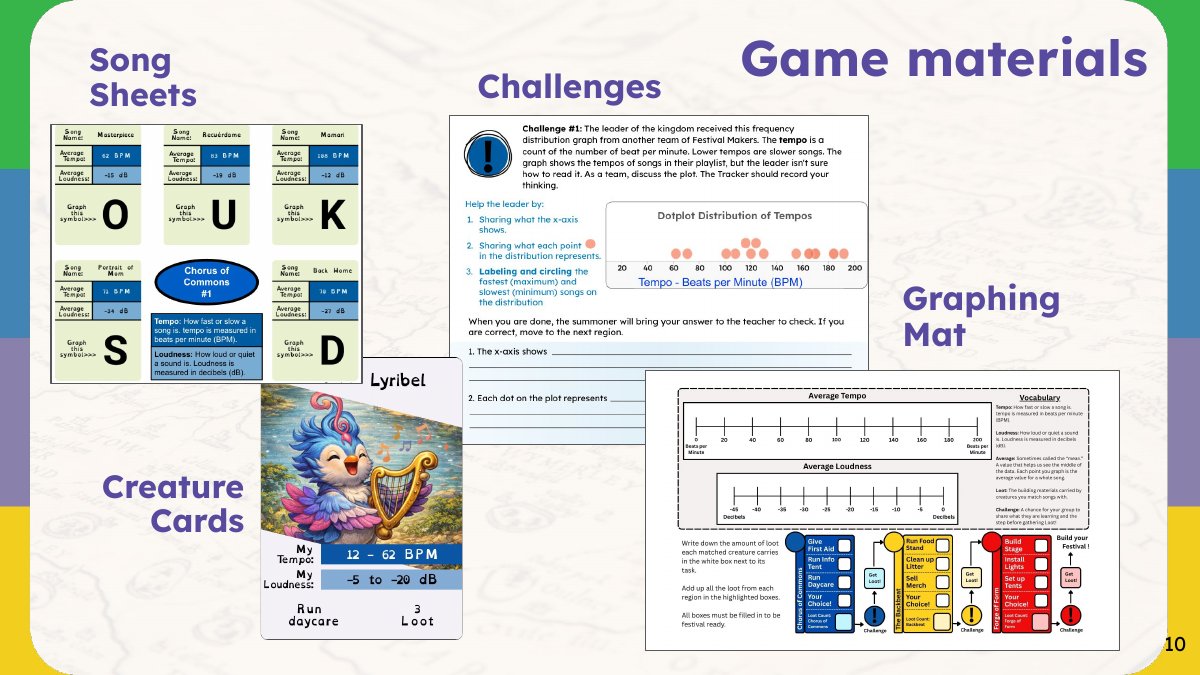
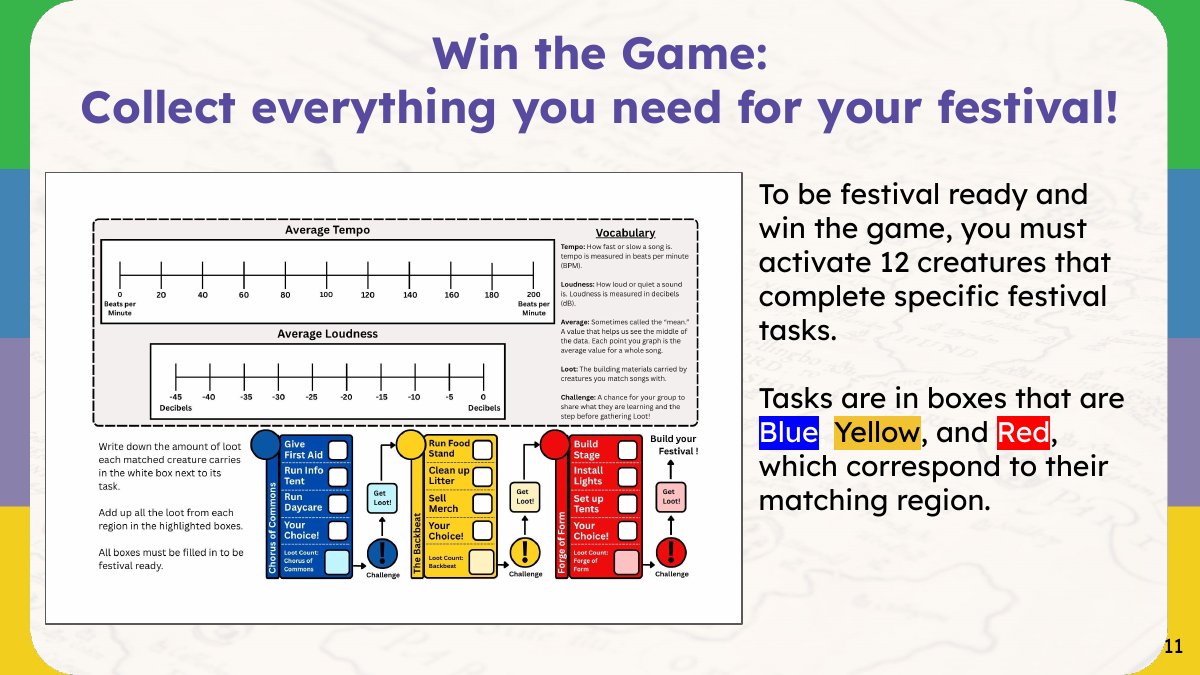
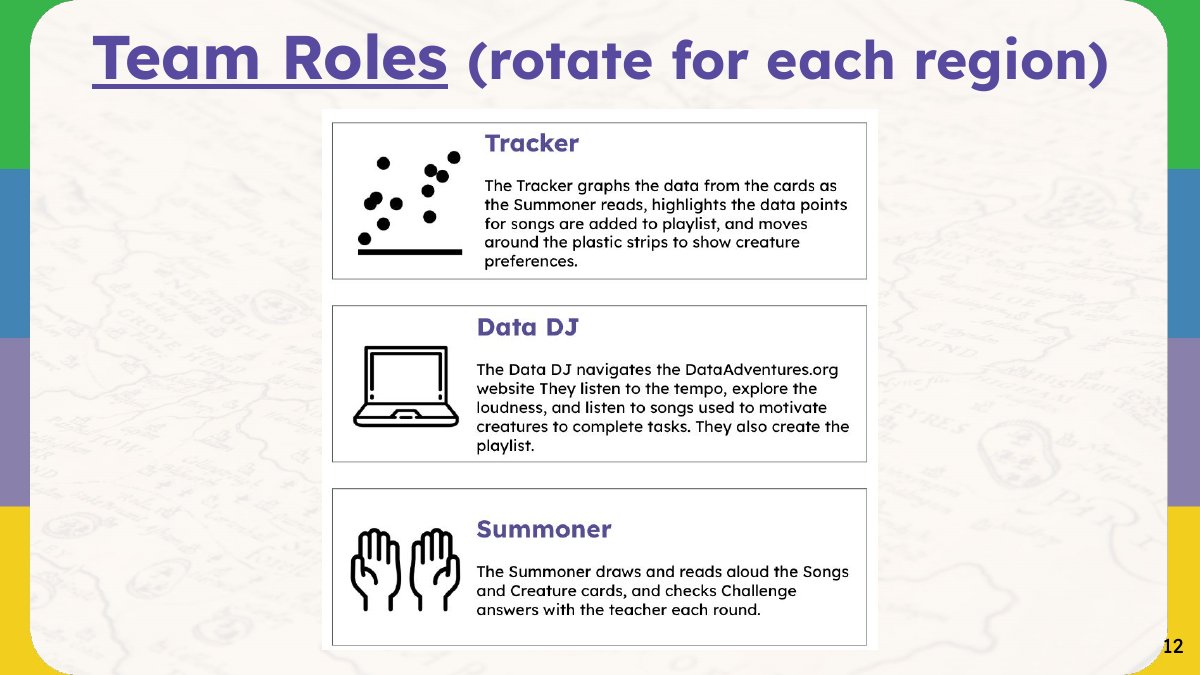
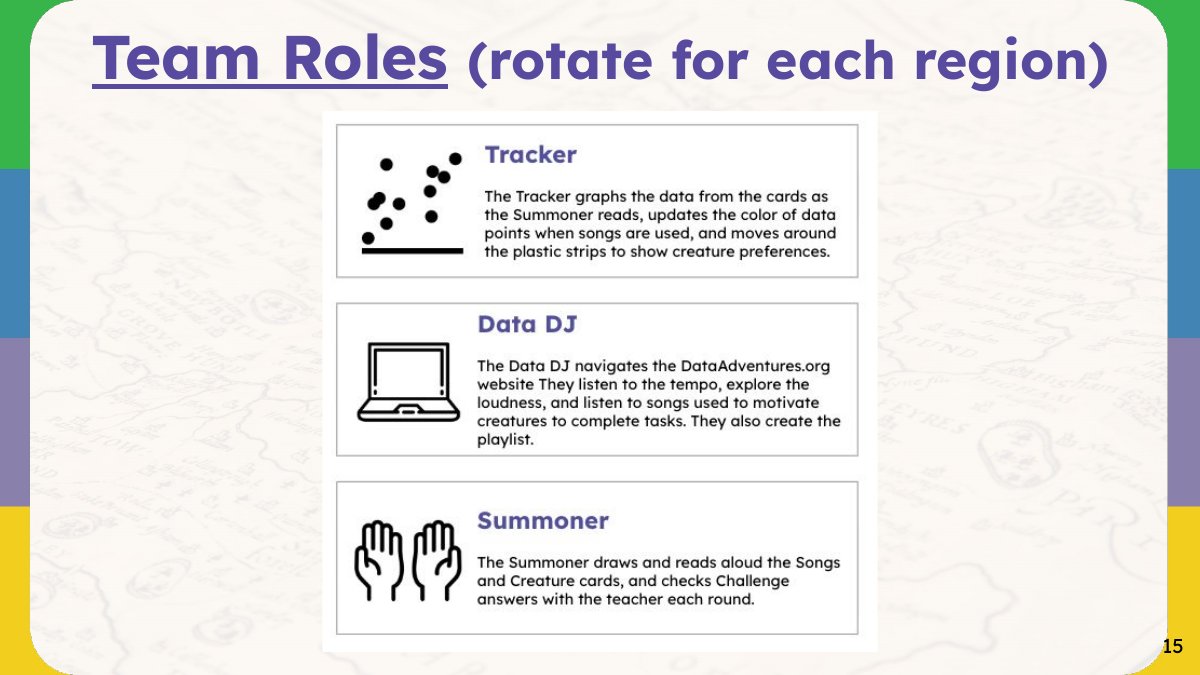
Give students a high-level overview of the game. Re-introduce and name the materials — song sheets, creature cards, challenge cards, and graphing mat (most were explored in Lesson 1's station rotation). Explain the win condition (checking the colored boxes on the Graphing Mat to activate creatures) and the three rotating team roles — Summoner (two hands), Data DJ (open laptop), and Tracker (simple graph).
-
How to Play Festival Maker
32 min · Slides 13–37
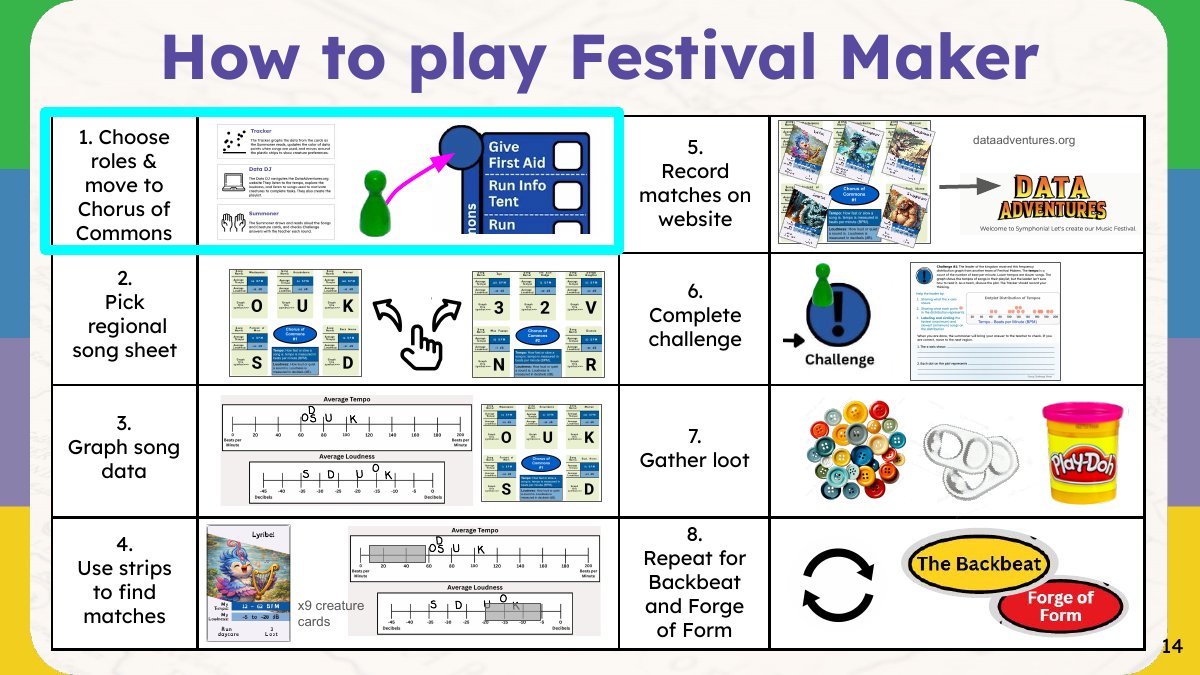
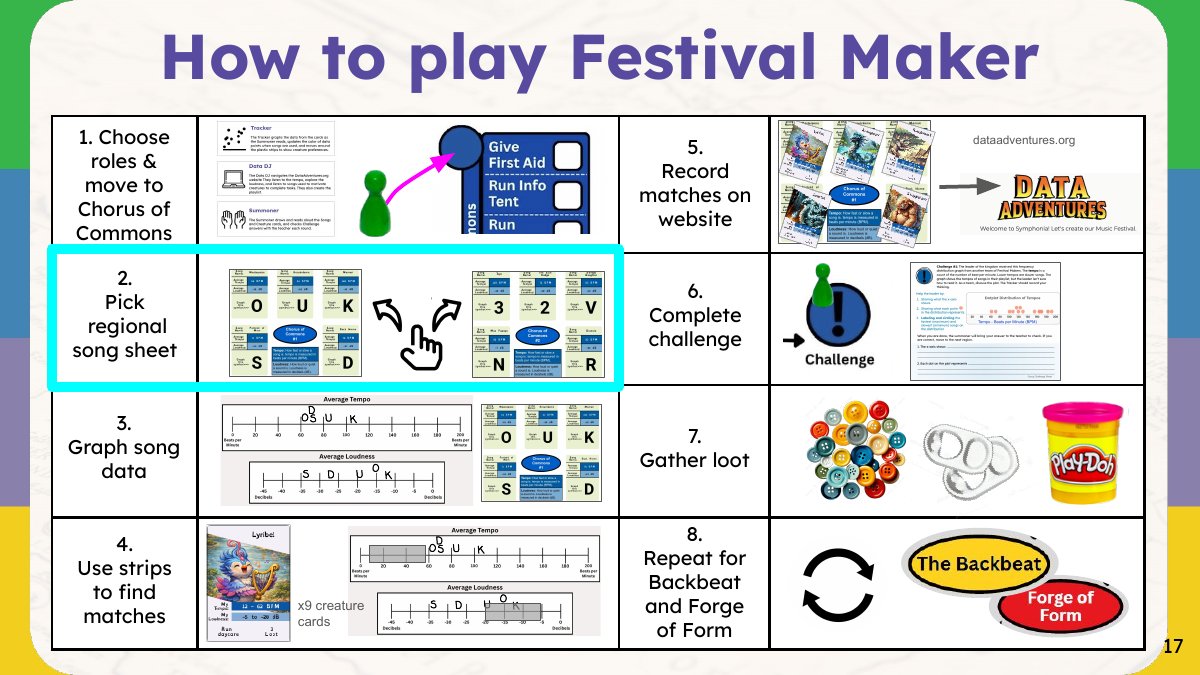
Walk the whole class through one full round in the Chorus of Commons, working in teams. Assign roles and move to the first region (Step 1), pick a song sheet (Step 2), graph the five songs' tempo and loudness (Step 3), then match and activate creatures with the translucent range strips, highlighting matched songs on the Graphing Mat and adding up the region's loot in the Loot Count box (Step 4). Finally, use dataadventures.org/festival/app to enter tempo and loudness, reveal the musical match, add each creature to the playlist, name it with a short code, and "Inscribe to Archives" (Step 5). Match Lyribel–Masterpiece, Hopsnap–Recuerdame, Rivergleam–Mamari, and Driftwing–Portrait of Mom. Have teams write their code on the back of their Graphing Mat — and if anyone loses it, you can look up any saved playlist by name at dataadventures.org/teachers/playlists.
-
Reflection & Closing Ritual
3 min · Slides 38
Clean up for gameplay tomorrow. Optional: guide students through a brief "Creature Reset" calming/reset routine.
| Section | Time | Slides | What happens |
|---|---|---|---|
| Welcome & Grounding, Connector | 4 min | 4–6 | Introduce Day 2 and share that today students will actually learn how to play the game. Play music as students enter and invite them to notice how it makes them feel and connect to last class. Then have each student choose a creature image that matches how they feel and share with a partner, small group, or reflect silently. |
| Review Visual Agenda & Agreements | 2 min | 7–8 | Review "Today's Adventure" and give students an overview of the day's activities. Review the classroom agreements, reinforcing expectations for teamwork and participation. |
| Game Materials & Set Up | 4 min | 10–12 | Give students a high-level overview of the game. Re-introduce and name the materials — song sheets, creature cards, challenge cards, and graphing mat (most were explored in Lesson 1's station rotation). Explain the win condition (checking the colored boxes on the Graphing Mat to activate creatures) and the three rotating team roles — Summoner (two hands), Data DJ (open laptop), and Tracker (simple graph). |
| How to Play Festival Maker | 32 min | 13–37 | Walk the whole class through one full round in the Chorus of Commons, working in teams. Assign roles and move to the first region (Step 1), pick a song sheet (Step 2), graph the five songs' tempo and loudness (Step 3), then match and activate creatures with the translucent range strips, highlighting matched songs on the Graphing Mat and adding up the region's loot in the Loot Count box (Step 4). Finally, use dataadventures.org/festival/app to enter tempo and loudness, reveal the musical match, add each creature to the playlist, name it with a short code, and "Inscribe to Archives" (Step 5). Match Lyribel–Masterpiece, Hopsnap–Recuerdame, Rivergleam–Mamari, and Driftwing–Portrait of Mom. Have teams write their code on the back of their Graphing Mat — and if anyone loses it, you can look up any saved playlist by name at dataadventures.org/teachers/playlists. |
| Reflection & Closing Ritual | 3 min | 38 | Clean up for gameplay tomorrow. Optional: guide students through a brief "Creature Reset" calming/reset routine. |
Materials & Prep
- No additional pages to print for this lesson.
- Creature CardsOrganize by group into blue, red, and yellow decks.
- Song SheetsOrganize by region. All 6 pages make one group's set.
- Graphing MatOne per team. Printed double-sided on 11x17 cardstock (not laminated) — students write on it with colored pencils and highlighter, and record their team and playlist name on the back.
- Translucent Range WindowsTwo pre-cut clear strips per team (1 in x 2.5 in) — one spans 50 BPM on the tempo graph, the other 15 dB on the loudness graph.
- Team Role CardsUpdated Aug 2026. One set per group of three.
- Challenge SheetsStudents preview the Chorus of Commons challenge today and complete it in Lesson 3.
- Blue colored pencils
- HighlightersThe Tracker uses a highlighter to mark off each matched song.
- Game piecesOne per team — any small pawn, cube, or figure.
- Projector
- Optional supportsNoise-reducing headphones, pause cards, sentence frames, multilingual vocabulary cards, visual reference posters, and a sensory guide.
- Facilitation Slide Deck — Day 2
- Festival Maker app — dataadventures.org/festival/appEach group needs one computer with sound, headphones, and internet access for recording playlists.
- Teacher tool — look up saved playlistsTeacher-facing (don't share with students). If a student forgets their playlist name/code, search saved playlists here.
- Reserve one laptop, Chromebook, or iPad per team — charged, with working sound and a pair of headphones to share.
- On a student device connected to the school network, open dataadventures.org/festival/app and play a song — songs play through YouTube on the site, so this confirms the school's web filter allows both the app and YouTube, and that audio comes through.
- Bookmark the teacher playlist lookup page (dataadventures.org/teachers/playlists) on your own device — you'll need it if a team loses their playlist code.
- Set up activity materials for each group — creature cards (blue, red, yellow), song sheets by region, team roles, graphing mat, colored pencils, highlighters, game piece, and headphones.
- Cue music for arrival.
- Display Slide 3.
- Collect and organize student data materials.
- Reflect on pacing, engagement, and data accuracy.
- Note any misconceptions about tempo, loudness, or data interpretation.
- Prepare materials for continued gameplay in the next session.
Slides & Teaching Guide
How to use these speaker notes
Every slide's notes follow the same four labels so you can find what you need at a glance.
- Time:
- Approximate pacing for the slide.
- Example Script:
- Suggested language to say to students. Paraphrase freely to match your voice.
- Do:
- Appears only when a specific action or facilitation move is needed (invite a volunteer, collect a data sheet, etc.). If you don't see a "Do" line, the script is all that's needed.
- Purpose:
- Why the slide is here and what it's building toward in the lesson.
-
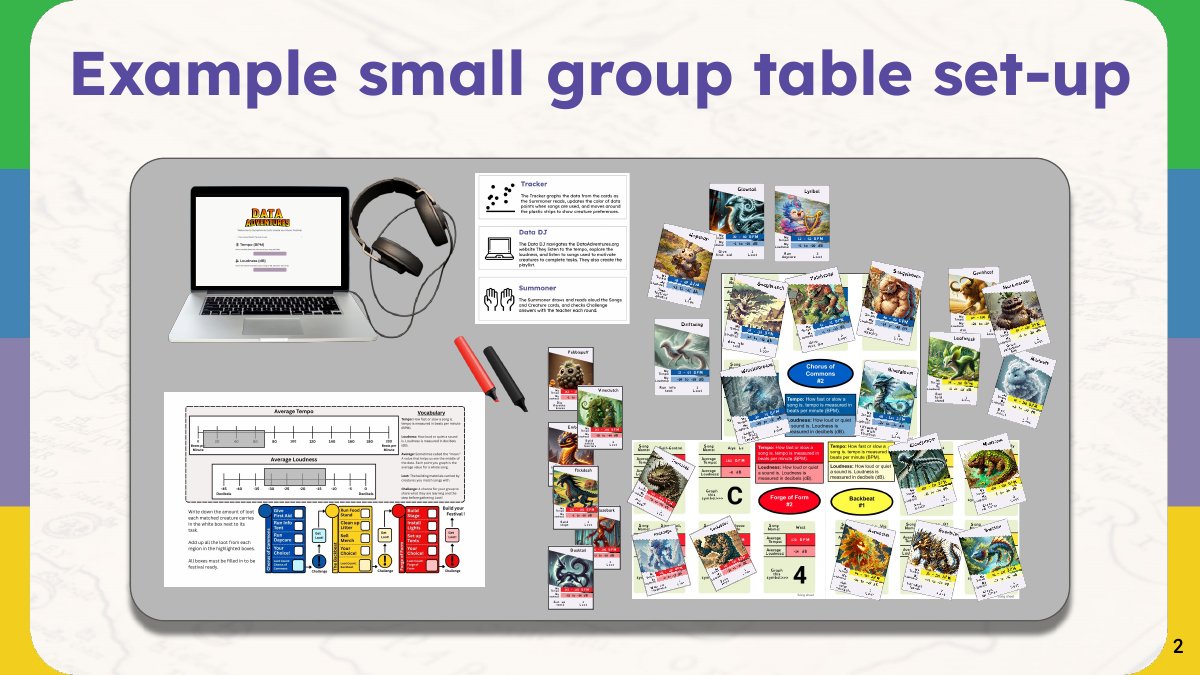
Slide 2 · Example small group table set-up
This is one example of how your table might be set up. You will need space for the Graphing mat, Song sheets, Creature cards, Team role cards, markers, and range windows. Keep the materials where your team can all see them. The goal is for the whole team to use the data, not for one person to do everything.
-
Slide 3 · Lesson 2
No teaching notes for this slide.
-
Slide 4 · Lesson Two
30 secondsDo: Play music as students enter (linked to the upper right hand corner of the slide).
Purpose: Priming students and setting context.
-
Slide 5 · Welcoming and Grounding
1 minuteTake a quiet moment to think back to our last session. What is one word, image, or gesture you remember? You can hold it in your mind, draw it with your finger on your desk, or show a small gesture if you want. You do not need to share out loud.
Do: Play music as students enter. (Linked to the upper right corner of the slide). Give students 30 to 60 seconds of quiet reflection. Allow students to respond silently, with a gesture, or they can make a note on a piece of paper or post-it note.
Purpose: Grounding and connecting back to previous lesson.
-
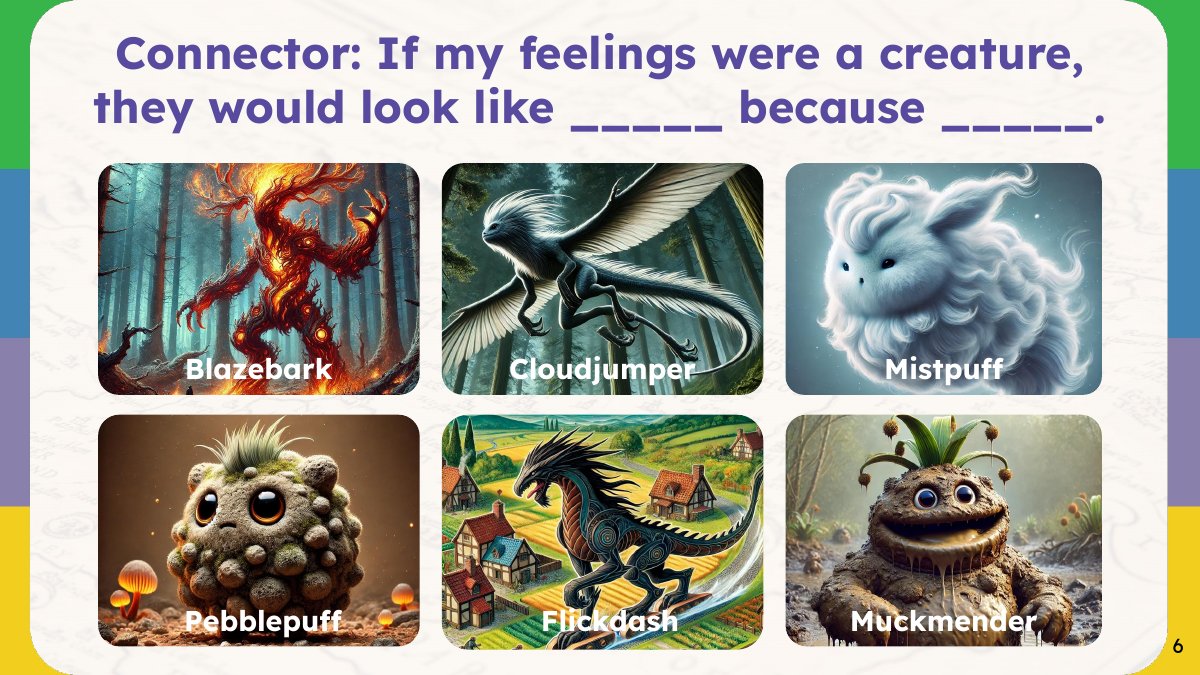
Slide 6 · Connector: If my feelings were a creature, they would look like _____
3 minLook at the creatures on the slide. Choose one that matches how you feel right now. You can think it silently, point to one, tell a partner, or use the sentence frame: “If my feelings were a creature, they would look like ___ because ___.” There is no wrong answer. This is just a quick way to check in before we work together.
Do: Invite 1 or 2 volunteers only if the group is ready.
Purpose: Helps students connect with one another while introducing the creatures from the Data Adventures world.
-
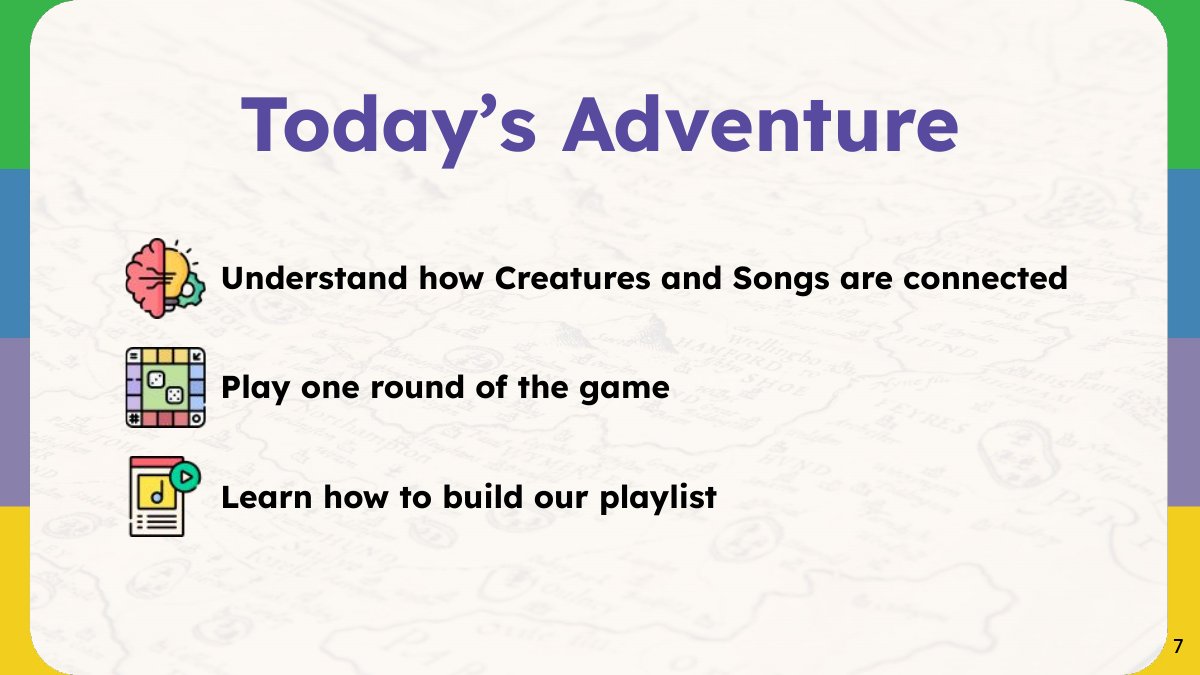
Slide 7 · Understand how Creatures and Songs are connected
2 minHere is our path for today. First, we will understand how creatures and songs are connected. Then we will practice three rounds of the game. Finally, we will learn how to build our playlist on dataadventure.org. Today is about learning the process, using evidence, and getting comfortable with the game steps.
Do: Connect the agenda to the objectives: using tempo, loudness, graph evidence, and decision-making.
Purpose: Agenda.
-
Slide 8 · Our Classroom Agreements
1 minBefore we start, let’s return to our classroom agreements. These agreements help us work as teams, try new ideas, and make sure everyone has a way to participate. As we play today, we will need to listen, take turns, use evidence, and help each other stay with the process.
Do: Be sure to copy and paste co-created agreements.
Purpose: Revisit classrooms agreements.
-
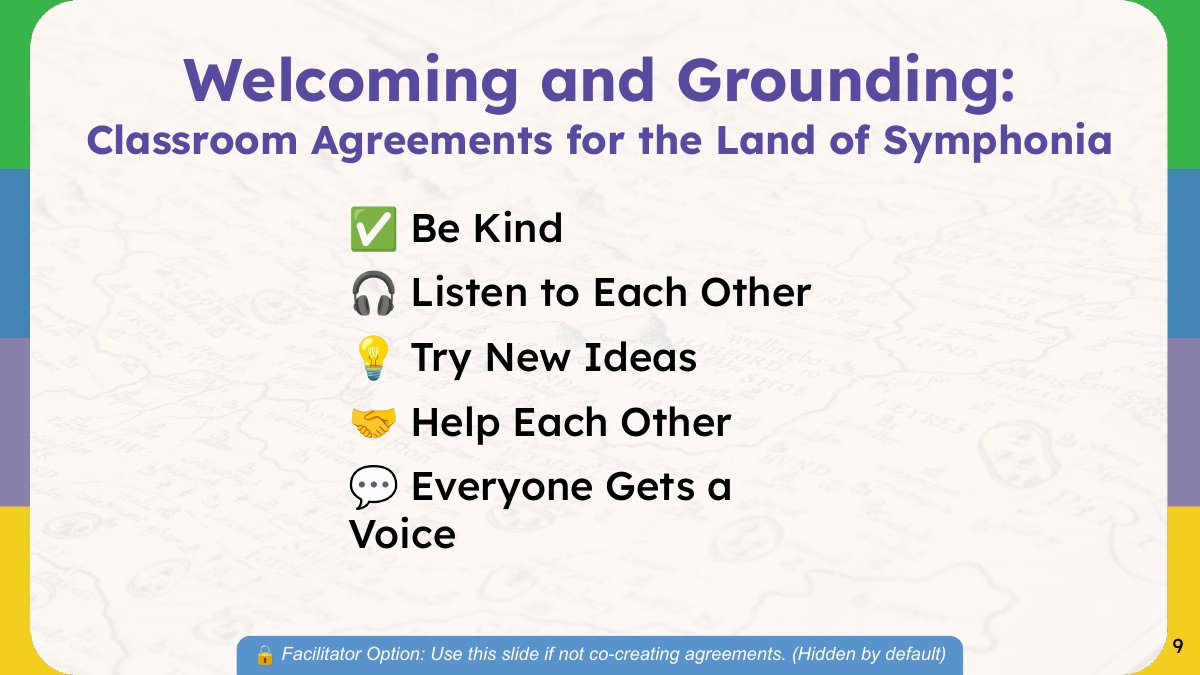
Slide 9 · Welcoming and Grounding:
1 minThese are our classroom agreements. Today, we will practice: be kind, listen to each other, try new ideas, help each other, and make sure everyone gets a voice. These are not just nice ideas. They will help your team make better decisions with the data.
-
Slide 10 · Song
2 minutesBefore we play, let’s name the materials. You will use Creature cards, Song sheets, Challenge sheets, and the Graphing mat. Creature cards tell us what a creature prefers. Song sheets give us the music data, including tempo and loudness. The Graphing mat helps us see the data visually. Challenge sheets are part of the game, but we are not completing them today.
Do: If students have materials, have them locate each item without using it yet. If students do not have materials, tell them they will get materials after the model.
Purpose: Familiarizes students with the materials and data tools used in the game.
-
Slide 11 · Win the Game:
1 minuteThe goal is to become festival ready by activating creatures that complete festival tasks. The colored boxes show required tasks. The white boxes are optional. Today, we are practicing how to use data to make matches and gather loot. We are not trying to rush through the whole game.
Purpose: Clarifies the required and optional tasks students must complete to prepare their festival.
-
Slide 12 · Team Roles (rotate for each region)
1 minuteEach team needs three jobs/or roles: Summoner, Data DJ, and Tracker. The Summoner draws and reads the Creature and Challenge cards for the team. The Data DJ uses the website to explore songs and data. The Tracker graphs the data and updates the game materials. You will rotate roles for each region so everyone gets a chance to have each role.
Do: Assign roles or have students choose roles quickly. If students have materials, have them pick up or place their role cards.
Purpose: Creates individual roles for the team.
-
Slide 13 · How to Play Festival Maker
32 minutes to complete Slides 13-36Today, we will complete the work for the Chorus of Commons together. Tomorrow, your team will complete the Backbeat and Forge of Form on their own.
Purpose: Clarifies scope of what the students are doing today.
-
Slide 14 · How to play Festival Maker
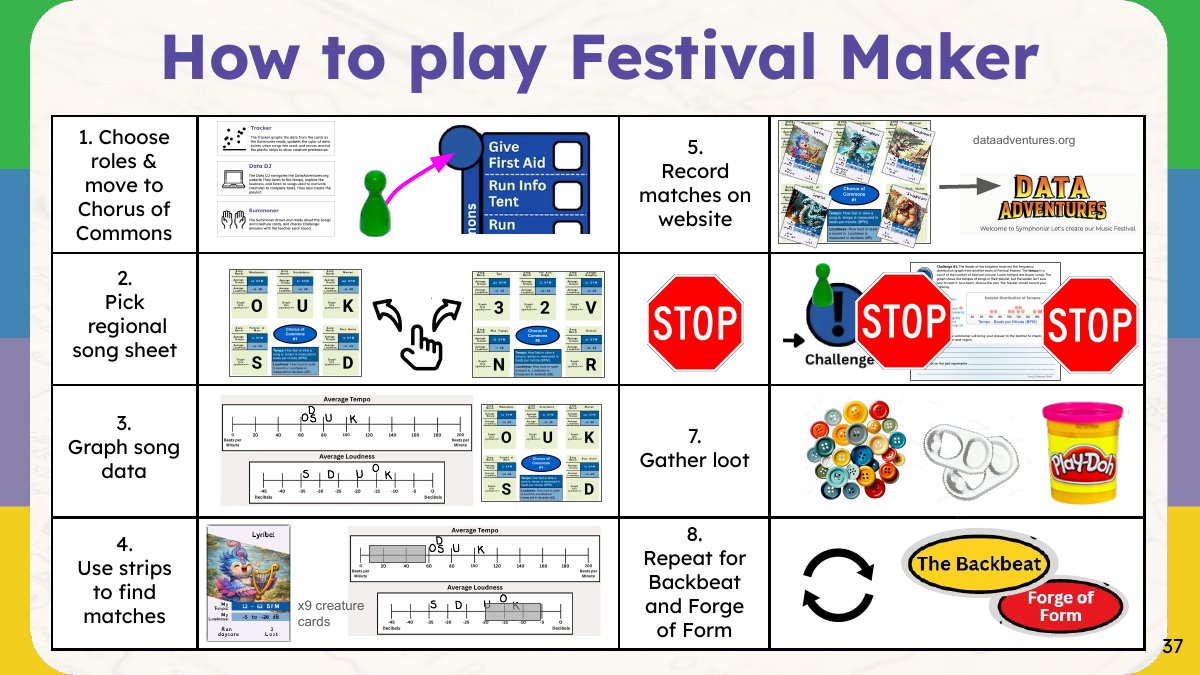
1 minuteToday, we will complete the work for the Chorus of Commons together. Tomorrow, your team will complete the Backbeat and Forge of Form on their own. This slide shows the whole game process. Today, we are practicing the steps so the game makes sense. The steps are: assign roles, move to the first region, pick a song, graph the data, use the strips to match a creature, gather loot, and then repeat for the other regions. Today we are not recording playlists on the website, and we are not completing challenge sheets.
Do: Remind students that one song can only be matched with one creature.
Purpose: Teaches students the whole game process.
-
Slide 15 · Team Roles (rotate for each region)
1 minuteEach team needs three jobs/or roles: Summoner, Data DJ, and Tracker. The Summoner draws and reads the Creature and Challenge cards for the team. The Data DJ uses the website to explore songs and data. The Tracker graphs the data and updates the game materials. You will rotate roles for each region so everyone gets a chance to have each role.
Do: Assign roles or have students choose roles quickly. If students have materials, have them pick up or place their role cards.
Purpose: Creates individual roles for the team.
-
Slide 16 · Animated Slide
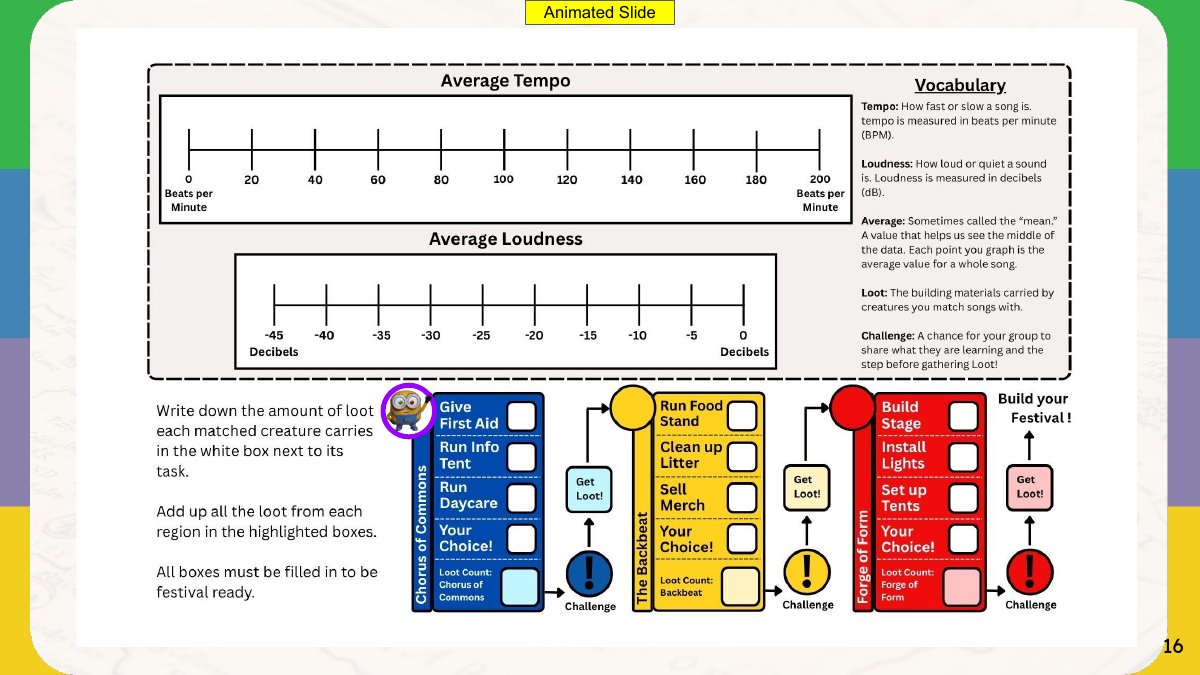
1 minuteFirst, the Summoner moves the team piece to the first region: Chorus of Commons. We are starting here together because this is our practice region. Watch what happens on the Graphing mat and game map as we move through the steps.
Purpose: Point to Chorus of Commons on the map. If students have materials, have the Summoner move the team piece to the first region. If students do not have materials, have students watch the screen.
-
Slide 17 · How to play Festival Maker
–Now we move to the next step.
Purpose: Help students learn how to complete step 2
-
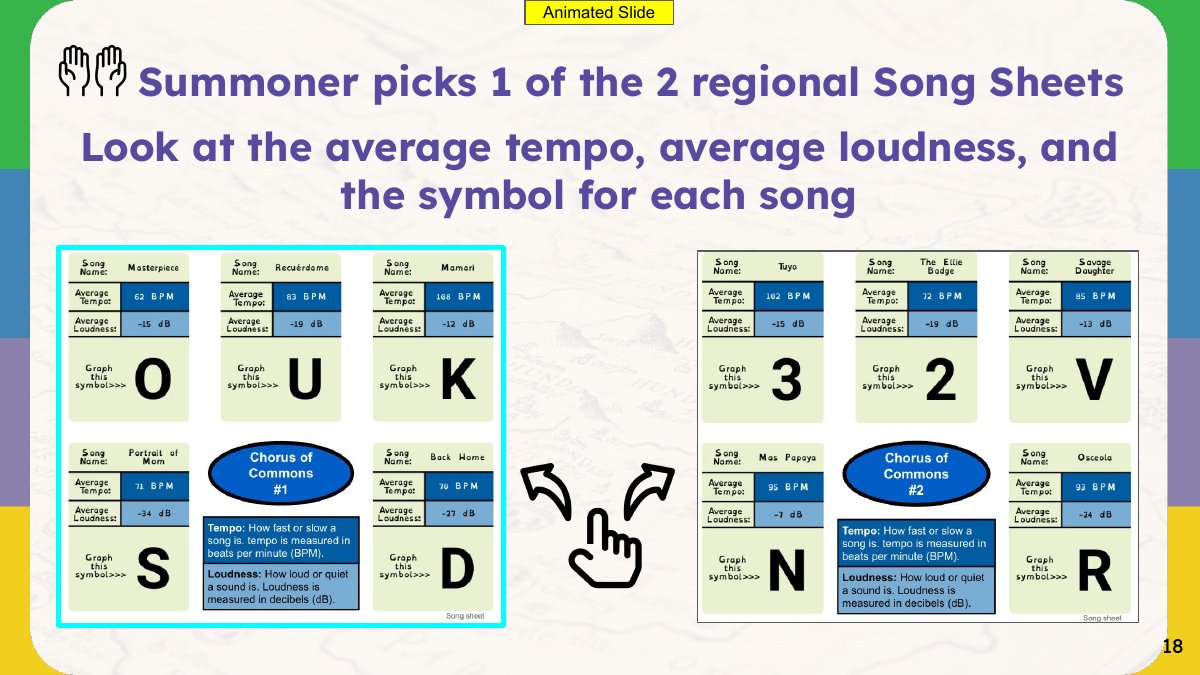
Slide 18 · Summoner picks 1 of the 2 regional Song Sheets
2 minutesNext, the Summoner chooses one of the regional Song sheets. For each song, we will look at the average tempo, the average loudness, and the graph symbol. These numbers and symbols are the evidence we will use to make a match.
Do: Point out the two Song sheet options. If students have materials, have teams use Song sheet #1 so they can follow the model. Name the three pieces of data students need: average tempo, average loudness, and graph symbol.
Purpose: Introduces the process of comparing song data and selecting songs for a playlist.
-
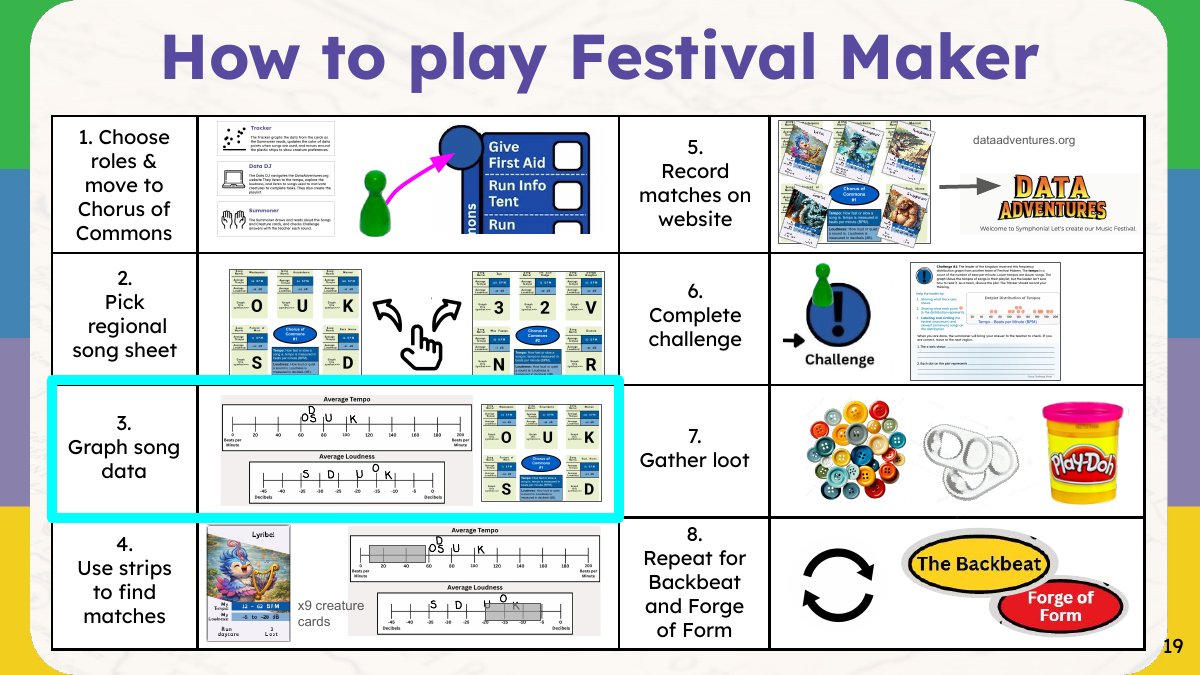
Slide 19 · How to play Festival Maker
5 minNow we move to the next step.
Purpose: Help students learn how to complete step 3
-
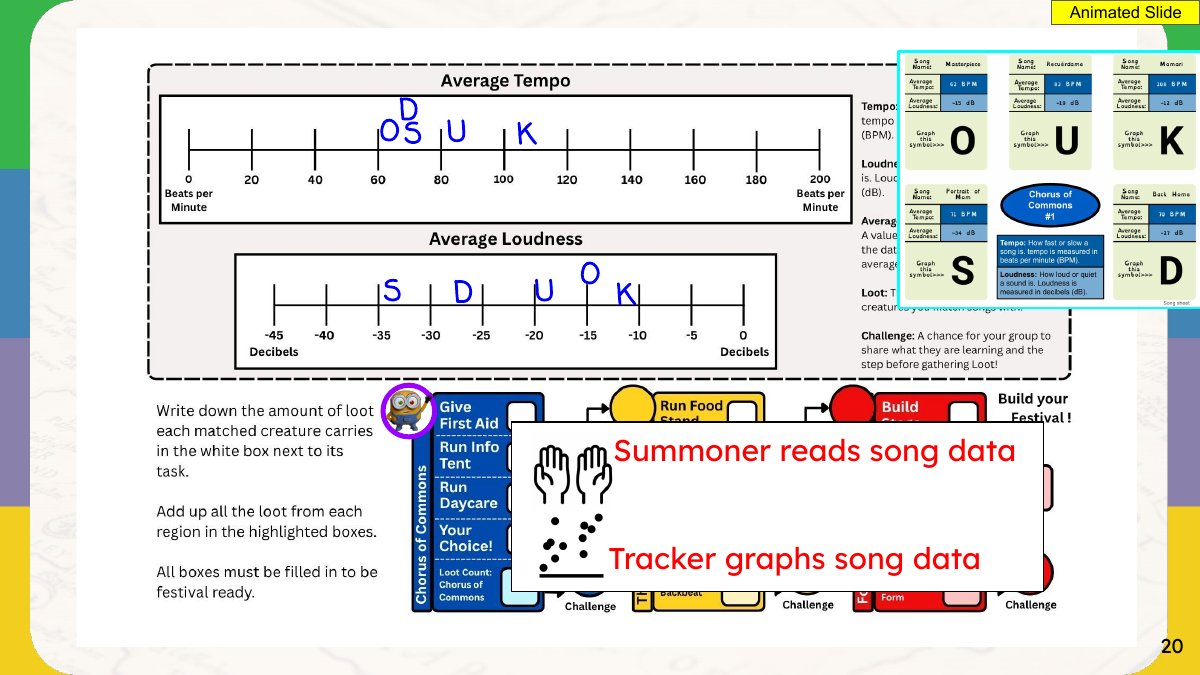
Slide 20 · Summoner reads song data
Now the Tracker graphs the songs from the Song sheet. The tempo goes on the top graph. The loudness goes on the bottom graph. The symbols go where the values fall on each number line. As we graph, we are turning the song data into visual evidence we can use.
Do: Model where tempo is graphed and where loudness is graphed. Ask: “Where does this tempo fall?” and “What do you notice?” If students have materials, have them follow along with the same Song sheet.
Purpose: Demonstrates how song data is represented on graphs and how players track information needed to complete challenges.
-
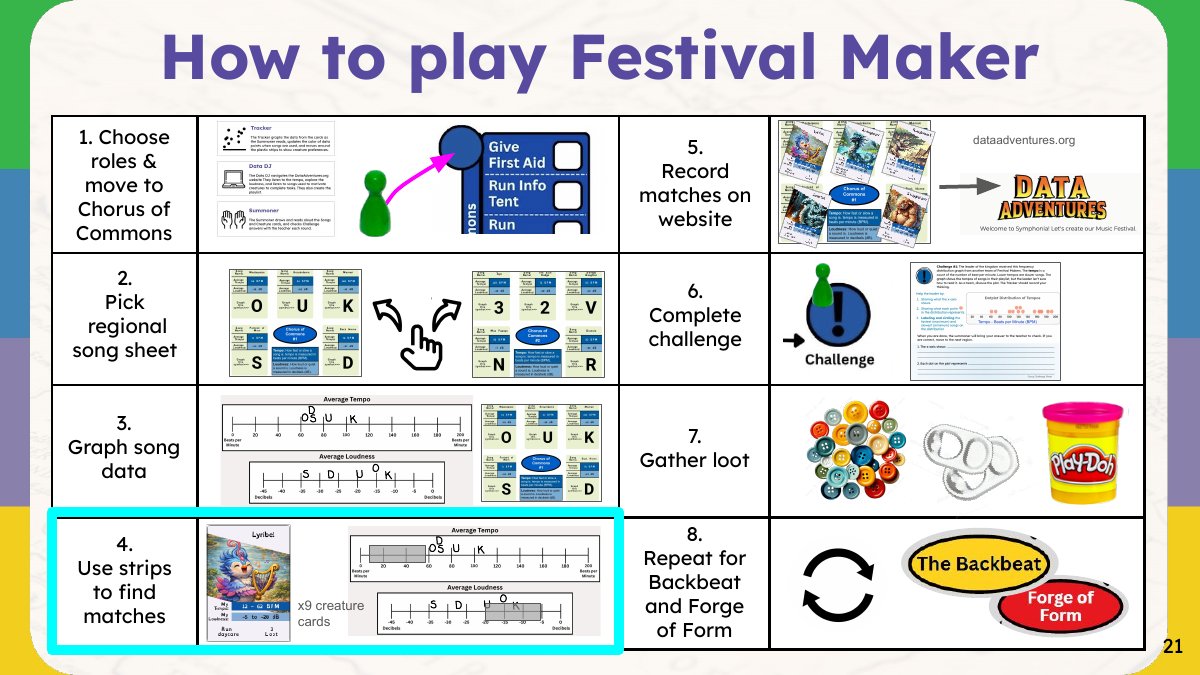
Slide 21 · How to play Festival Maker
5 minNow we move to the next step.
Purpose: Help students learn how to complete step 4
-
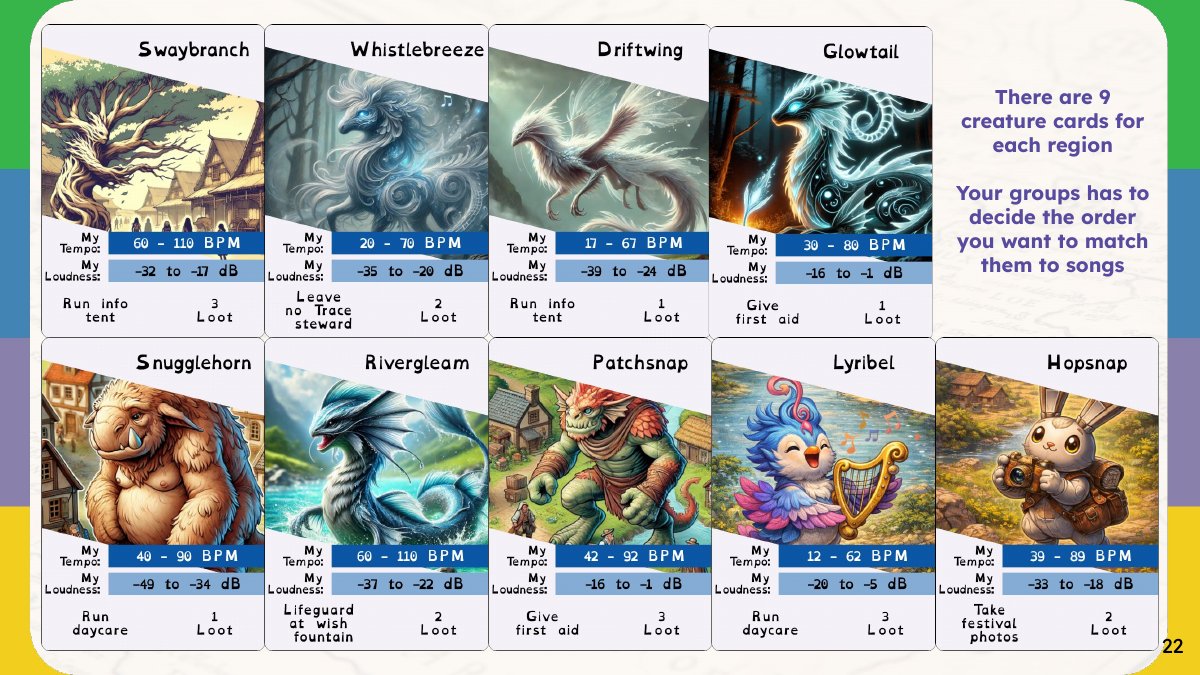
Slide 22 · There are 9 creature cards for each region
1 minThere are 9 creature cards in each region. We can sort our cards in many different ways.
Purpose: Help students learn how to complete step 4
-
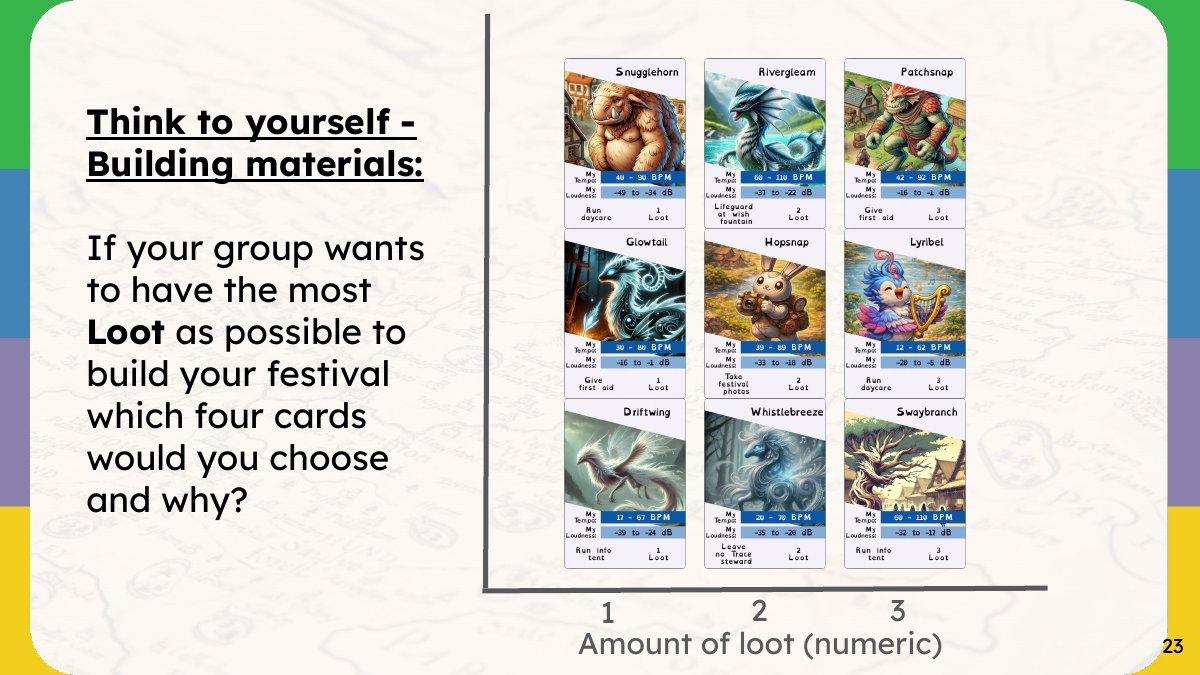
Slide 23 · As a team, pick an order that you want to match them.
1 minImagine what your cards would look like if you wanted to sort them based on loot.
Do: Read the question aloud.
Purpose: Help students learn how to complete step 4
-
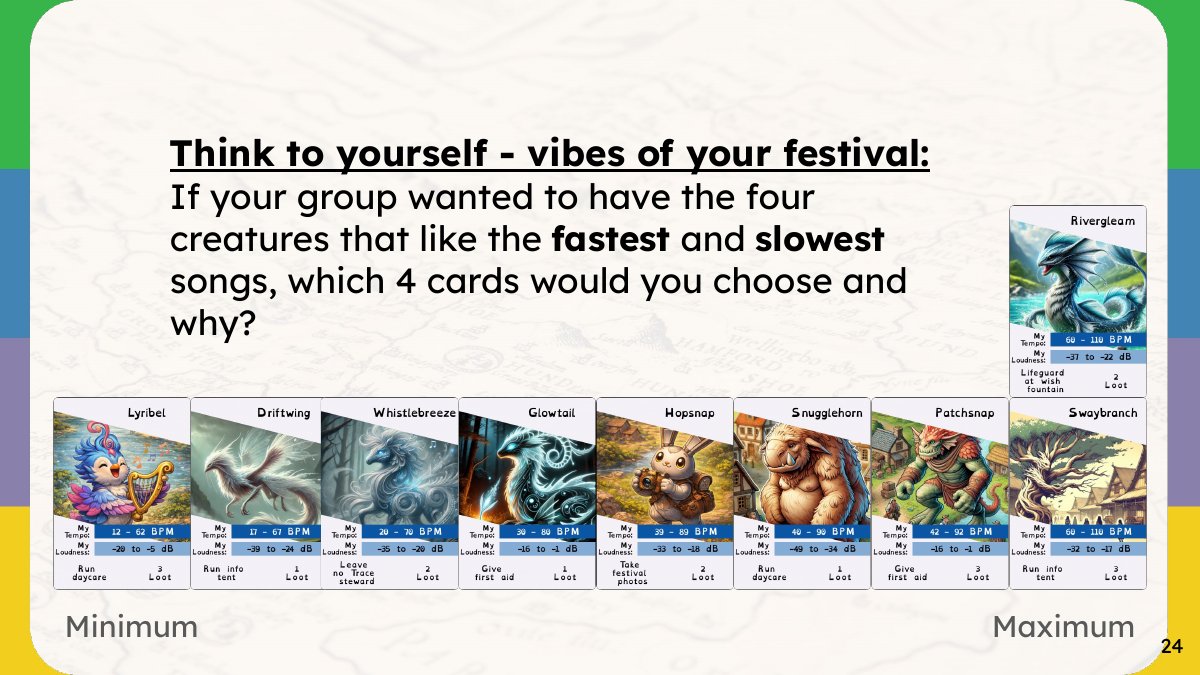
Slide 24 · As a team, pick an order that you want to match them.
1 minRead the question aloud. How would you sort them to answer this question?
Do: Read the question aloud.
Purpose: Help students learn how to complete step 4
-
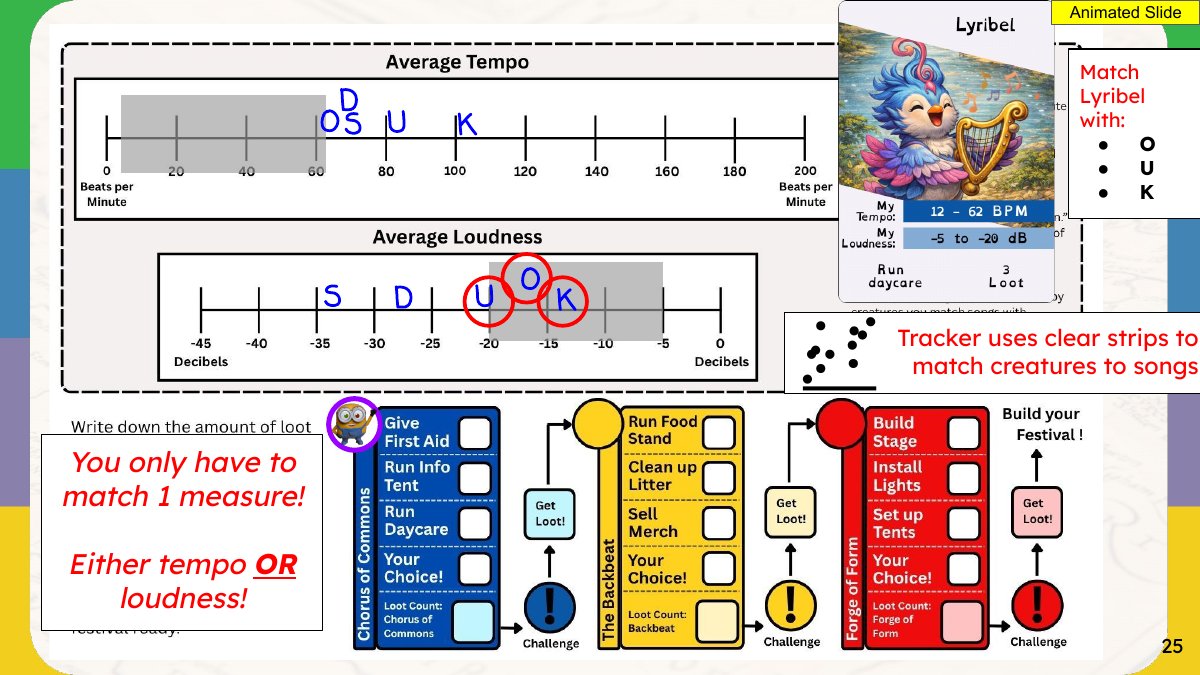
Slide 25 · Match Lyribel with:
1 minNow the tracker uses the Creature card and the graph evidence to find a match. A creature can match a song using either tempo or loudness. The translucent range windows help us see the creature’s preferred range. For tempo, the window shows a range of 50 BPM. For loudness, the window shows a range of 15 dB. We are looking for songs that fall inside the creature’s preferred range. For Lyribel, we match with song J, Song L, and Song %.
Do: Show how to place the translucent range window on the tempo graph. Then show how to place the translucent range window on the loudness graph. Ask: “Which song symbols fall inside the range?”
Purpose: Demonstrates how to match creatures to songs using data.
-
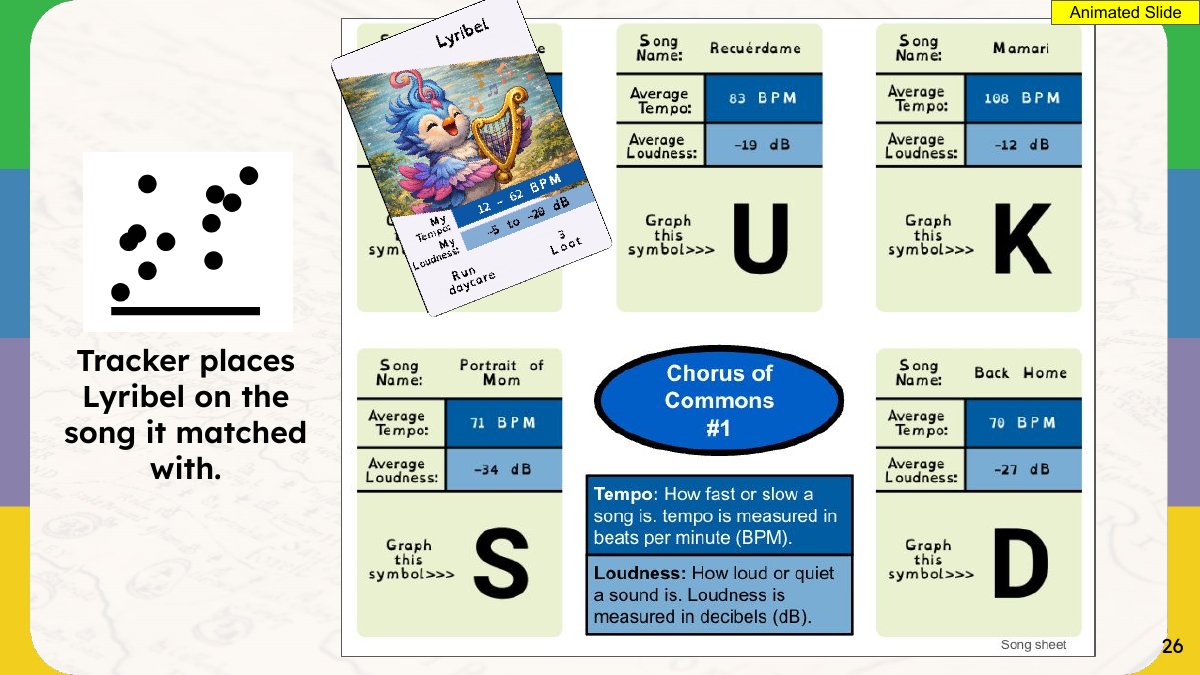
Slide 26 · Tracker places Lyribel on the song it matched with.
1 minFor this example, we are matching Lyribel with “Masterpiece.” Once the team decides on a match, place the Creature card directly on the song it matched with. This helps the Data DJ later because the team can clearly see which creature matched which song.
Do: Model placing the Creature card on the matched song. Say the evidence used for the match. Remind students that each song gets only one creature match.
Purpose: Models how players use evidence from data to make and record a match between a creature and a song.
-
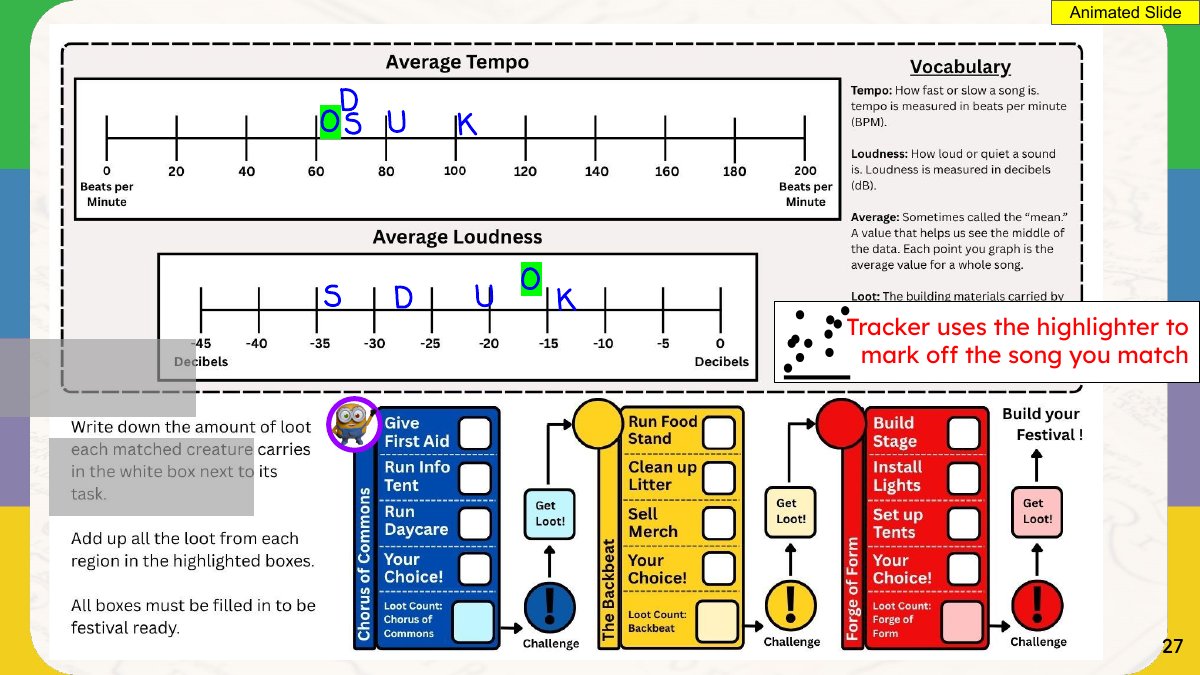
Slide 27 · Tracker uses the highlighter to mark off the song you match
1 minNow the tracker uses the Creature card and the graph evidence to find a match. A creature can match a song using either tempo or loudness. The translucent range windows help us see the creature’s preferred range. For tempo, the window shows a range of 50 BPM. For loudness, the window shows a range of 15 dB. We are looking for songs that fall inside the creature’s preferred range. For Lyribel, we match with song J, Song L, and Song %.
Do: Show how to place the translucent range window on the tempo graph. Then show how to place the translucent range window on the loudness graph. Ask: “Which song symbols fall inside the range?”
Purpose: Demonstrates how to match creatures to songs using data.
-
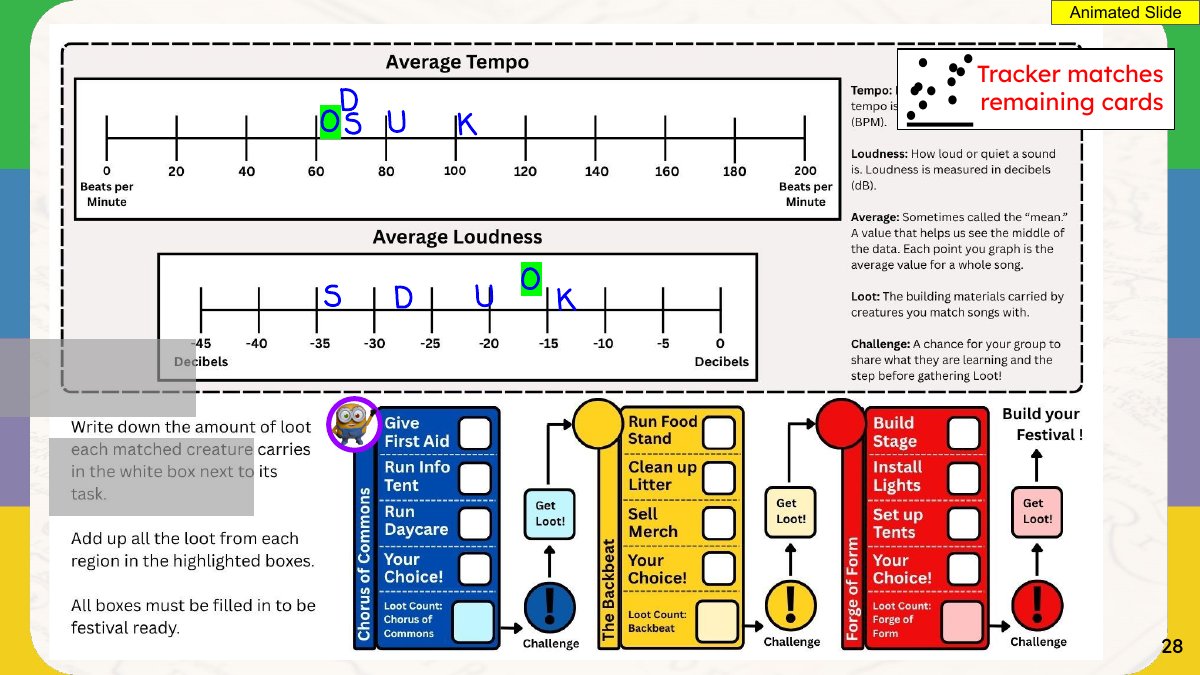
Slide 28 · Tracker matches remaining cards
3 minNow the team repeats the matching process for the remaining creatures in this region. You will look at the creature’s preferences, use the range window on the graph, and choose a song that fits the data. In this region, you need three specific tasks completed, and there may be an optional task your team can also complete.
Do: Point back to the progress bar so students understand the goal for the region. Remind students that they are matching with graph evidence, not guessing.
Purpose: Clarifies how players progress by completing required and optional tasks.
-
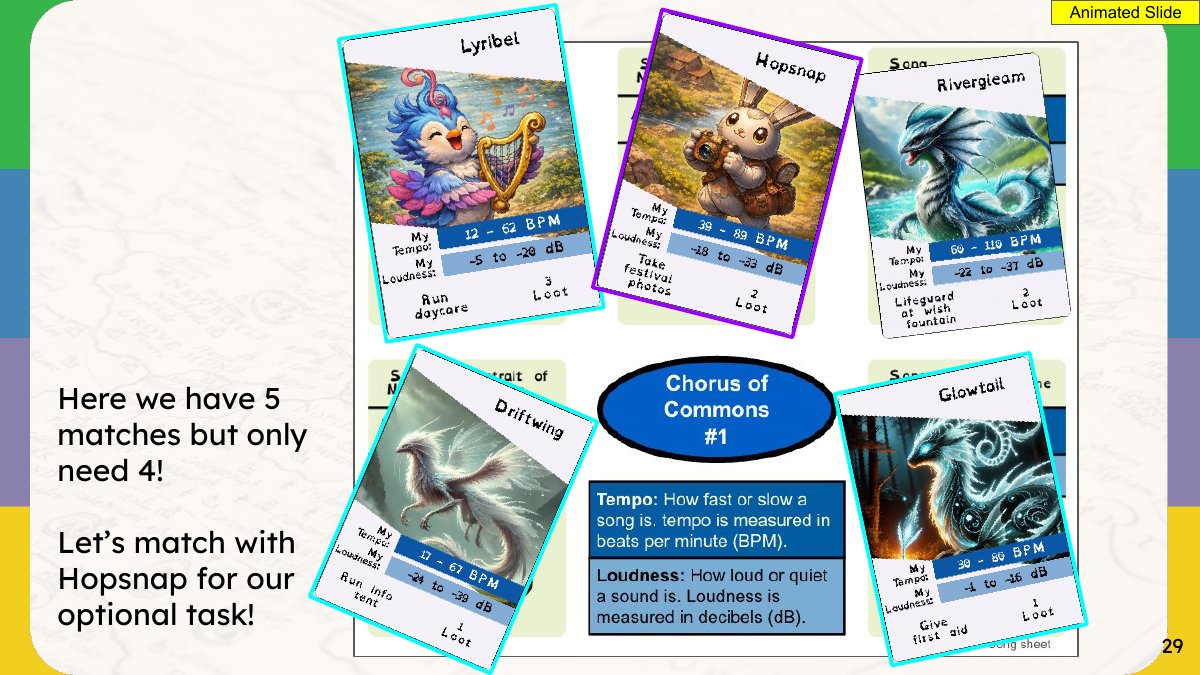
Slide 29 · Here we have 5 matches but only need 4!
1 minHere is an example where the group found five possible matches, but they only need four tasks. Lyribel runs the daycare, Glowtail gives first aid, and Driftwing runs the info tent. Now the team has a choice. Which optional task should they pick: festival photos with Hopsnap or lifeguard at Wish Fountain with Rivergleam?
Purpose: Models gameplay.
-
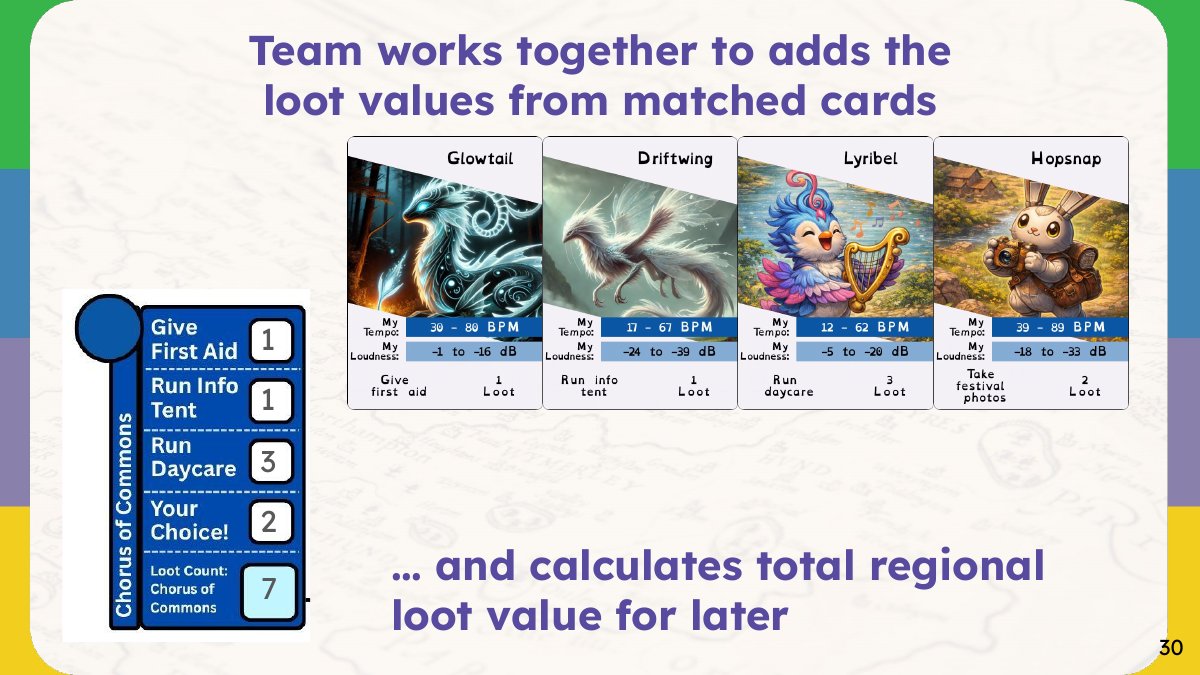
Slide 30 · Team works together to add the loot values from matched cards
1 minNow we need to add up all of our region loot so we can grab it later in the game after completing the regional challenge. Each matched creature has a loot number in the lower right and the task they complete in the lower left.
Purpose: Models gameplay, practices addition.
-
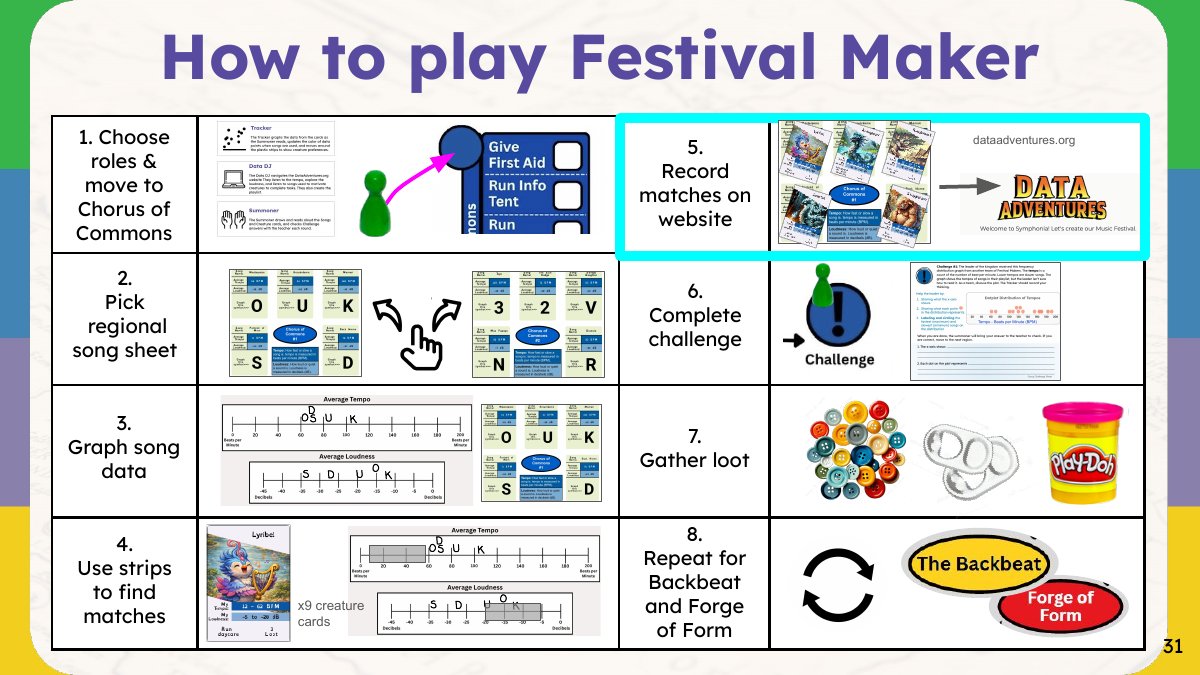
Slide 31 · How to play Festival Maker
5 minNow we move to the next step.
-
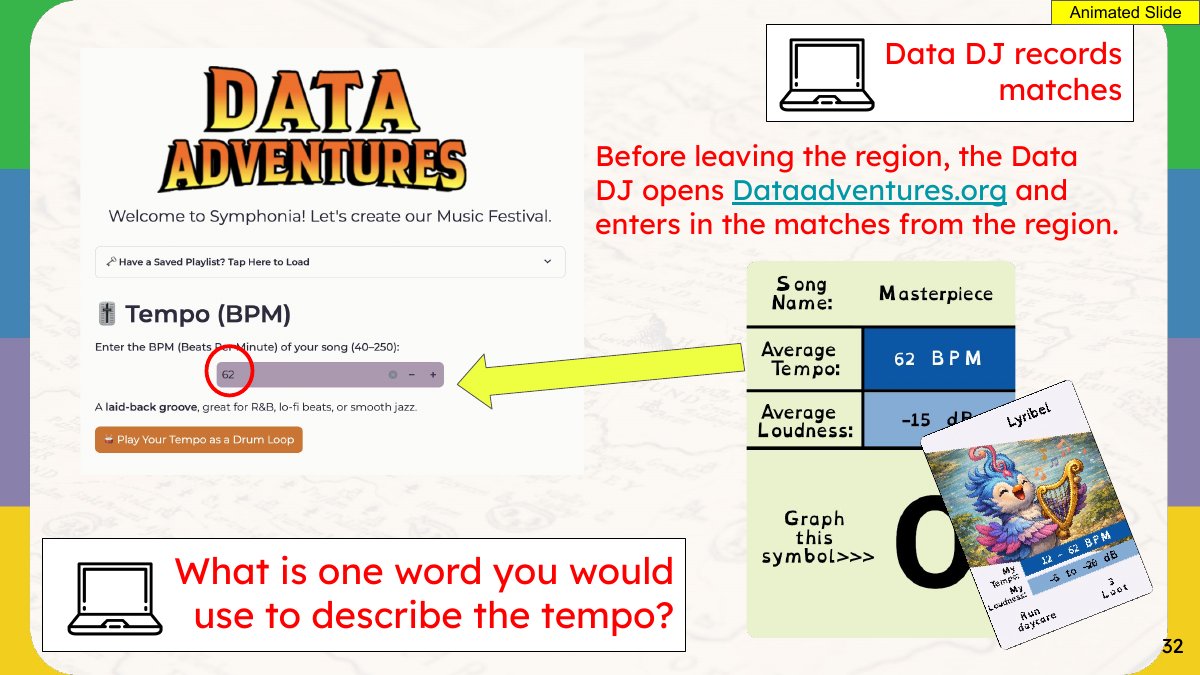
Slide 32 · Before leaving the region, the Data DJ opens Dataadventures.org and en
2 minThis slide shows how matches will eventually be recorded on the Data Adventures website. The Data DJ enters the tempo and loudness for the song. For today, this is a preview. Do not record playlists on the website today.
Purpose: Shows the process of how matches will be recorded.
-
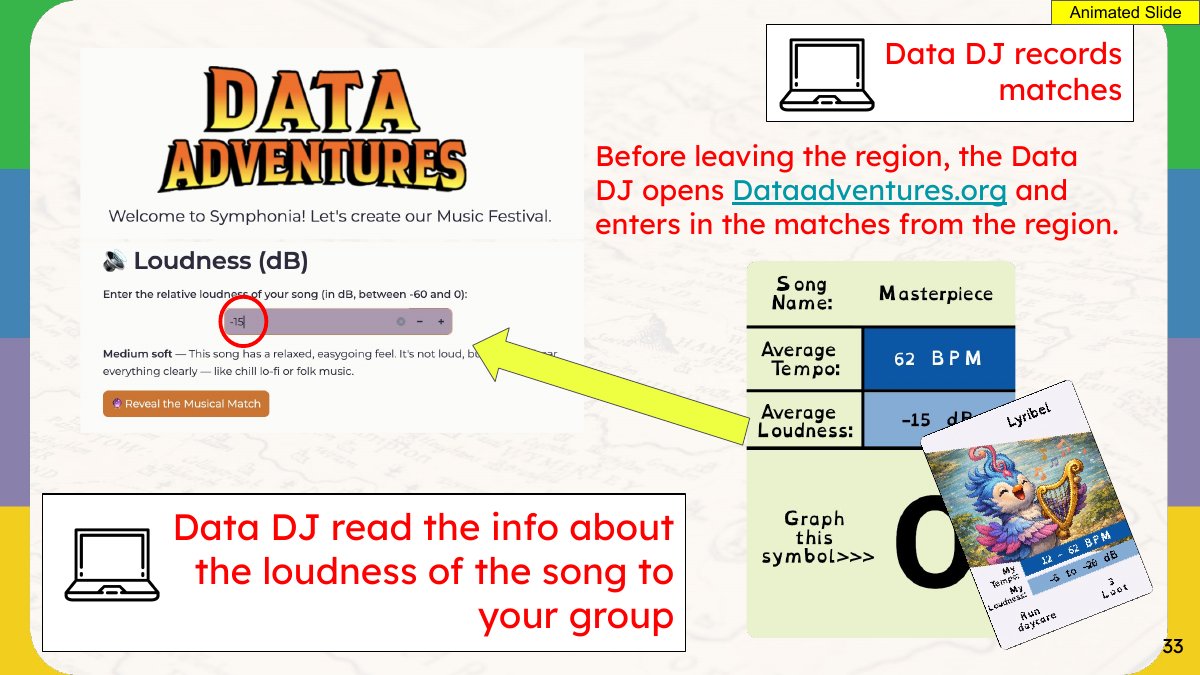
Slide 33 · Before leaving the region, the Data DJ opens Dataadventures.org and en
2 minThis slide shows how matches will eventually be recorded on the Data Adventures website. The Data DJ enters the tempo and loudness for the song. For today, this is a preview. Do not record playlists on the website today.
Purpose: Shows the process of how matches will be recorded.
-
Slide 34 · Data DJ listens to
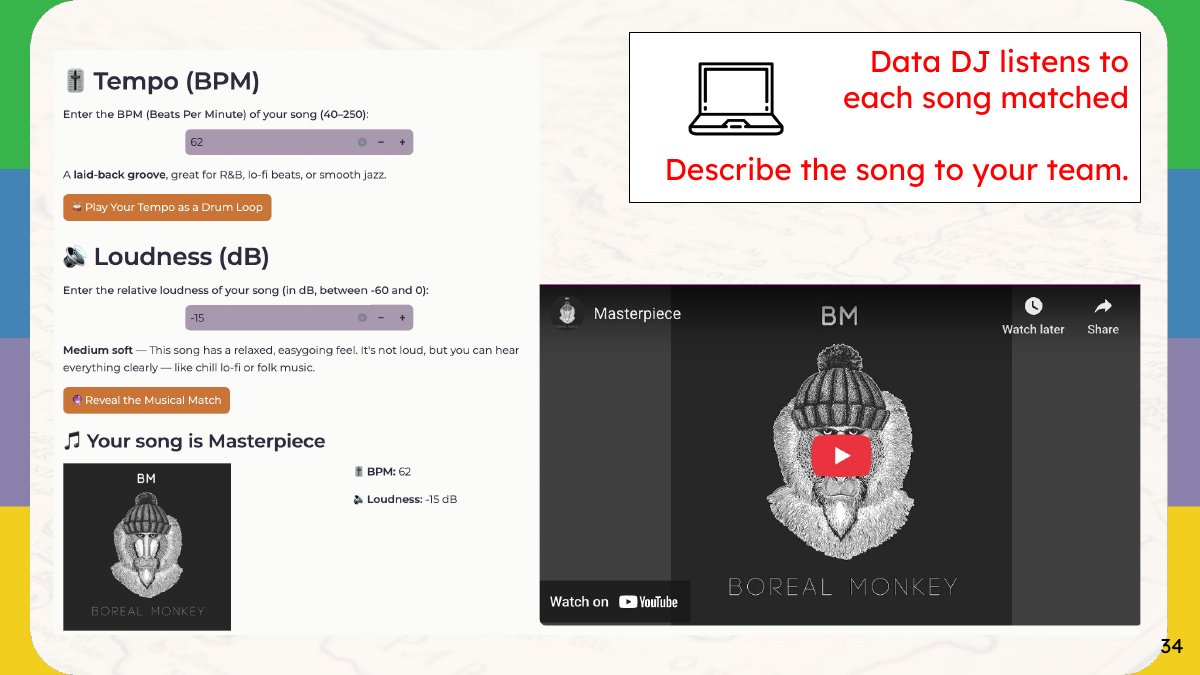
2 minWhen this step is used, the Data DJ listens to the song your group matched. The Data DJ can briefly describe what the song sounds like to the group. The rest of the team can listen to the description and connect it back to the creature and the data.
Do: Ask optional listening prompts: “What do you notice?” “How does the song make you feel?” “Does it remind you of anything?”
Purpose: Connects the song data to real music, helping students understand that tempo and loudness represent actual characteristics of a song.
-
Slide 35 · Data DJ selects the
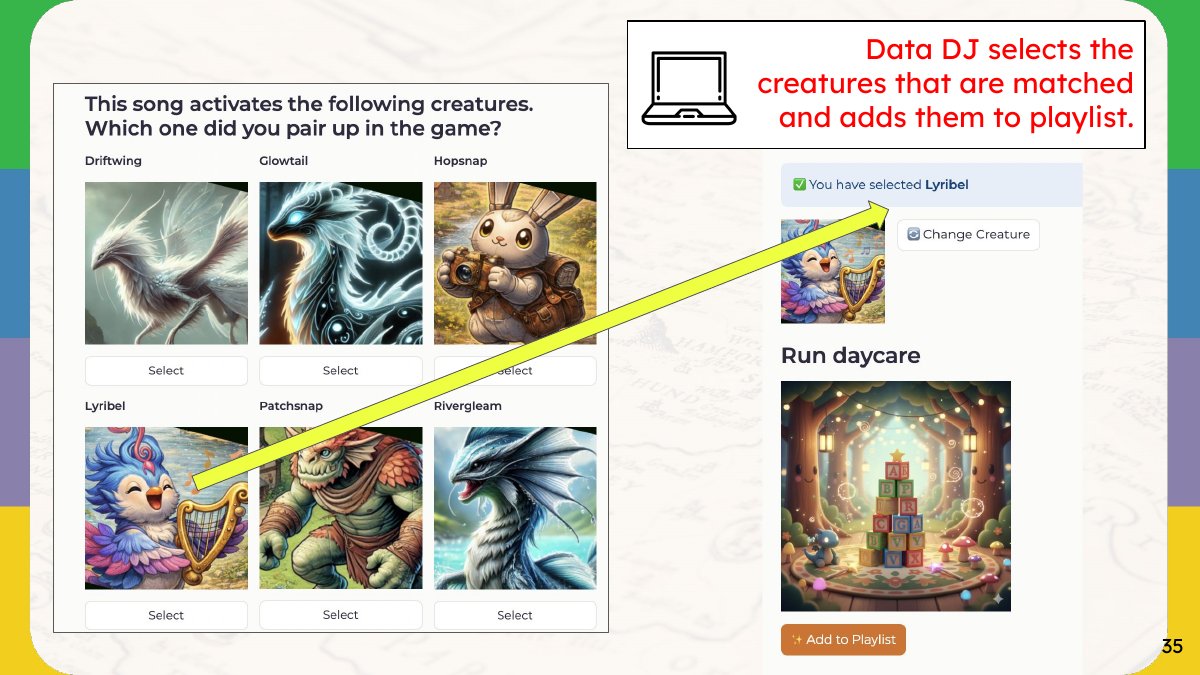
2 minThis slide shows how the Data DJ will eventually select the creature that matched the song and add it to the playlist. In this example, the team matched the song to Lyribel, so the Data DJ would select Lyribel. Then click “Add to Playlist.”
Purpose: Demonstrates how data-based matches are used to build a playlist and complete festival tasks.
-
Slide 36 · Name your playlist
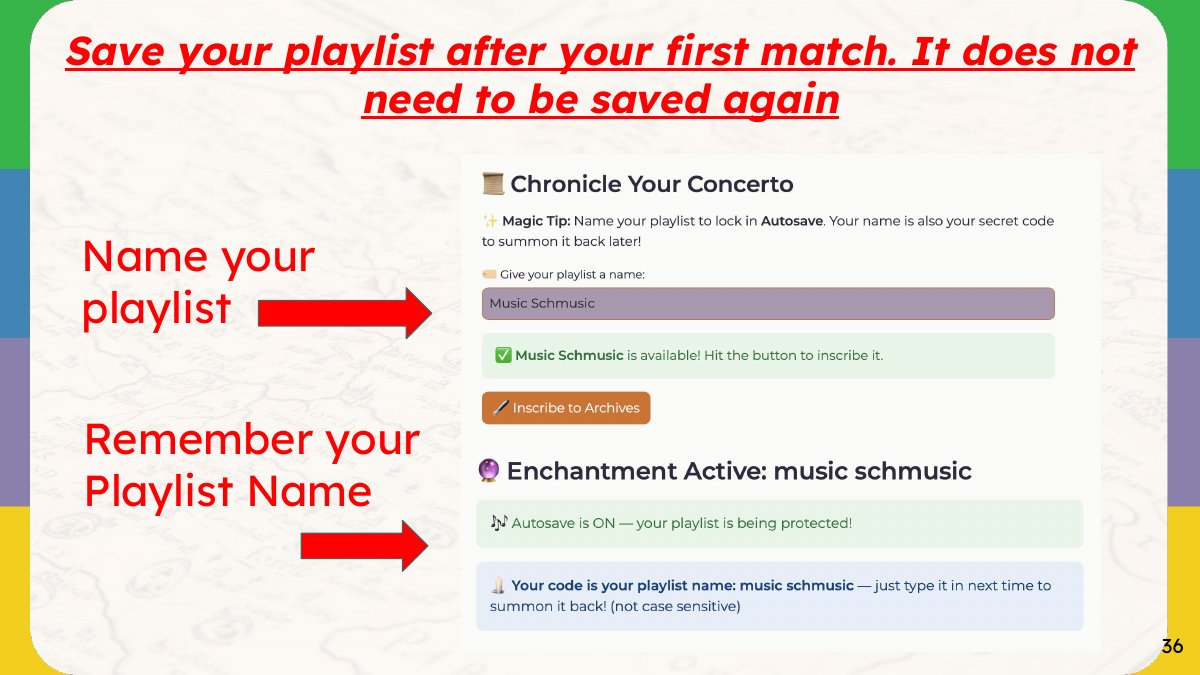
6 minThis is an important future step. After the first match is entered, the Data DJ saves the playlist. The team needs to choose a playlist name they can remember and write it somewhere safe. For today, do not actually save a playlist. We are only getting familiar with what this step will look like.
Do: Point out that the playlist name acts like a code students will need later.
Purpose: Prevents students from losing progress by saving and remembering their playlist name. Teacher Tip: There is a space provided on the back of the student’s game mat for team name and also to keep track of their playlist name — prompt students to flip the mat over and write the playlist name down there. This larger game mat can also be folded to keep loot or other papers together.
-
Slide 37 · How to play Festival Maker
1 minOnce we have built the playlist for the Chorus of Commons and finished making our matches, we complete one last final challenge you will turn into me. Completion of this challenge lets you visit the Loot Buffet to capture your bounty. We will walk through that process at the beginning of the next period and then your teams can move on the two next two regions.
-
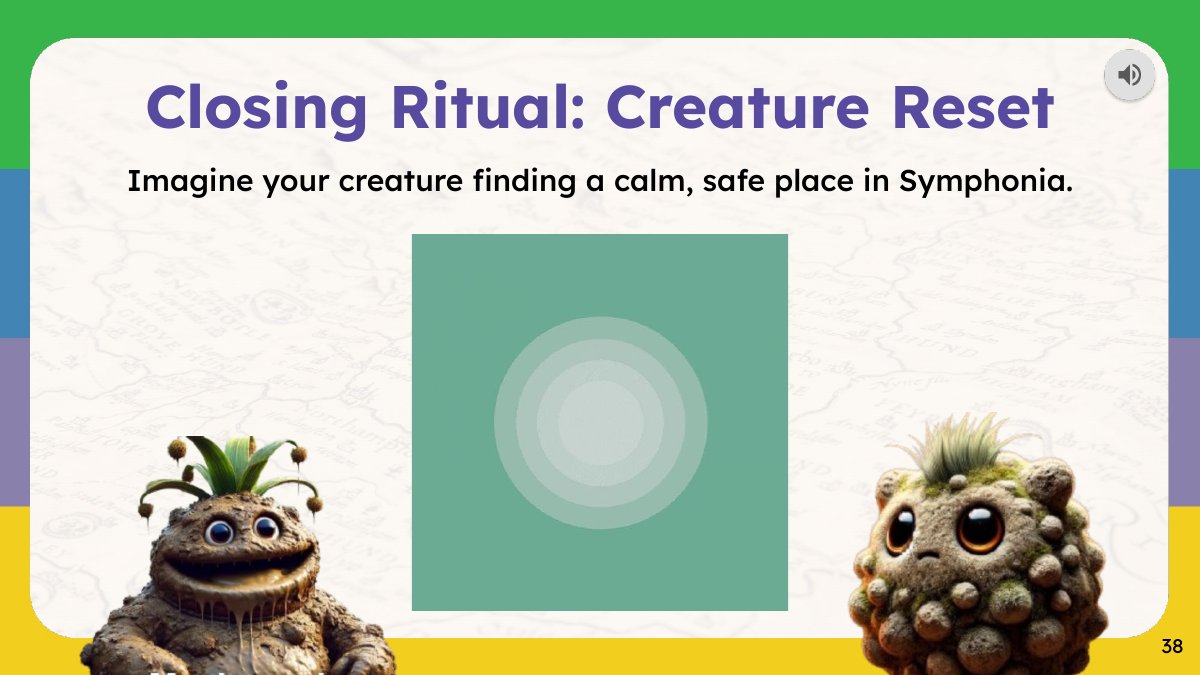
Slide 38 · Closing Ritual: Creature Reset
1 minTake a moment to breathe before we move on. Imagine your creature finding a calm, safe place in Symphonia. You do not have to say anything out loud. Just take a quiet moment to reset. Use the gif to cue you when to inhale, pause, and exhale..
Do: Play the embedded audio. Give students a quiet moment to breathe or reset.
Purpose: Closing.